Short answer
Build a custom ERP when the processes that make you money don't fit the assumptions built into off-the-shelf software. Buy off-the-shelf when your processes are ordinary and the package's way is fine. The expensive mistake isn't choosing wrong at the start it's buying a package that disagrees with how your business works and then paying to bend it into shape, one customisation at a time.
There's a moment in most ERP demos that decide everything, and it usually passes without comment.
The prospect describes how they do something how they price, how they allocate stock, how they calculate a commission. The vendor's consultant nods and says: “You'd handle that slightly differently in our system. Most of our clients find the standard approach works well.”
Sometimes that's excellent advice. Your process may be an accident of history that nobody has questioned in twelve years, and adopting a well-tested standard would be an improvement.
Sometimes it's the beginning of a very expensive problem because the thing you were describing is the thing that makes you better than your competitors, and you've just been asked to give it up to fit a database schema.
Telling those two situations apart is the whole job. Everything else in an ERP decision is detail.
The €500 million version of this question
Lidl spent roughly seven years and an estimated €500 million on SAP implementation before abandoning it in 2018.
The root cause is worth understanding properly, because it's usually told wrong. Lidl valued inventory at purchase price. SAP Retail's standard approach valued it at retail price. That sounds like an accounting technicality. Lidl’s method was woven into how the business operated and competed.
Faced with the choice, Lidl decided to change the software rather than change itself. And once that decision was made, the programmer entered what one analysis calls a “structurally unstable state”: every customization preserved Lidl's logic at the cost of more complexity, until the platform “became harder to maintain and less aligned with its original purpose” (Henrico Dolfing).
The usual moral drawn from this is “don't customize your ERP.” I think that's the wrong lesson.
The actual lesson is that the decision was made too late. By the time you're customizing a package heavily, you've already answered the question you've established that the package's assumptions don't match your business and you're now paying the most expensive possible price for that answer. The cheap moment to find that out is before you buy, not three years into an implementation.
This isn't an argument that everyone should build customs. Most businesses shouldn't. It's an argument for doing the analysis properly, early, while it's still a conversation rather than a sunk cost.
The question that decides it
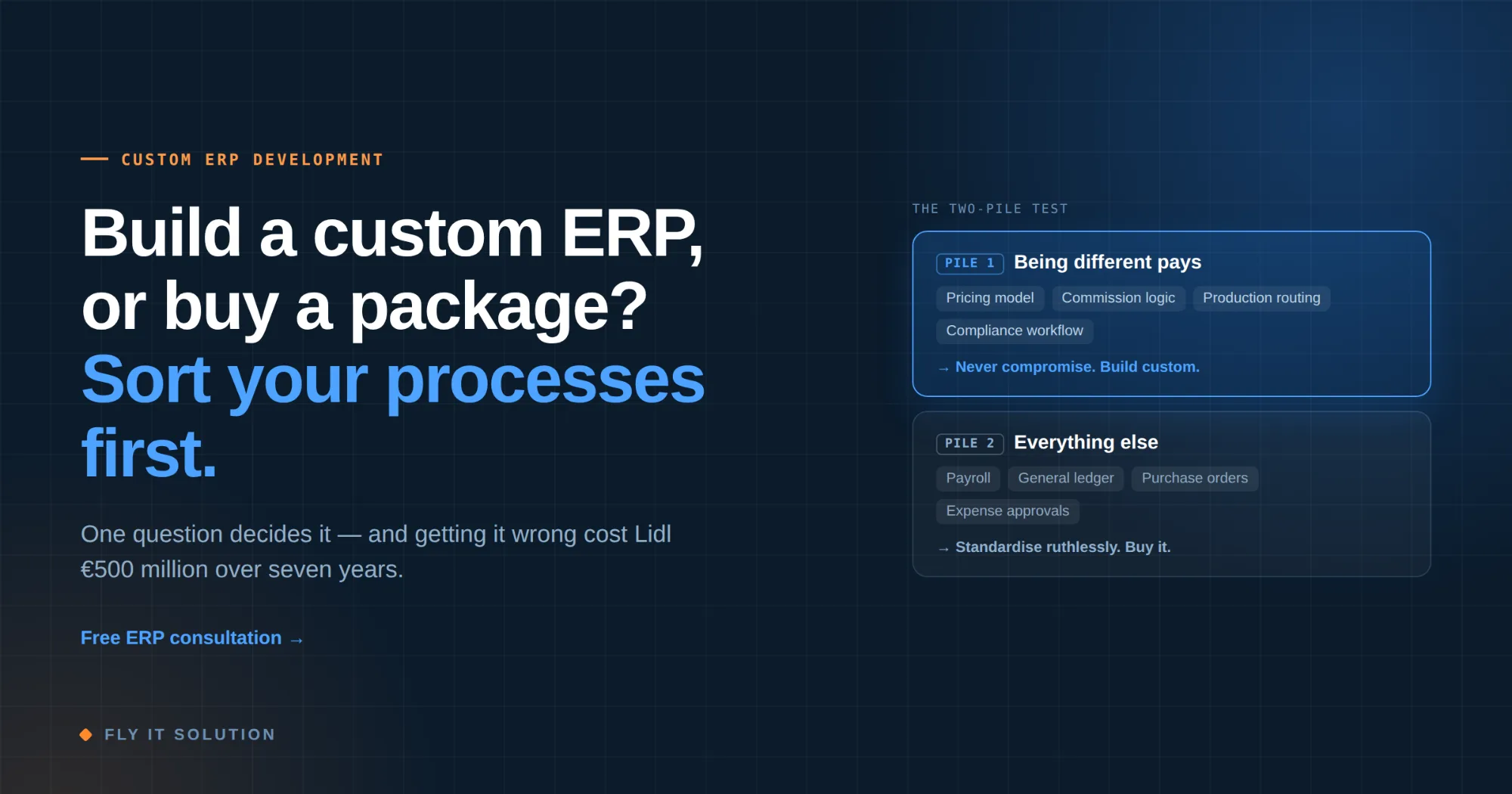
Forget feature comparisons for a moment. Take your operations and sort every significant process into two piles.
Pile one: processes where being different is worth money. Pricing model competitors can't easily copy. The route work through your facility. The commission structure that keeps your best salespeople. The compliance workflow that lets you serve a regulated client nobody else will touch. These are the reasons customers choose you.
Pile two: everything else. Payroll. General ledger. Standard purchase orders. Expense approvals. There is no competitive advantage in doing these in an unusual way, and considerable cost in trying.
Now the rule, which is simpler than most ERP advice you'll be given:
| Standardise piles two ruthlessly. Never compromise pile one. |
|---|
Most companies have far more in pile two than they assume which is exactly why off-the-shelf ERP is the right answer for a great many businesses. But almost every company has something in pile one, and when a package can't accommodate it, no amount of configuration will fix that.
The failure mode is treating a pile-one process as though it were pile two because a consultant said the standard approach works well for most clients. You are not most clients in the one area where you're different.
Off-the-shelf, custom, or somewhere in between
Three viable routes, and the third is the one most people don't consider.
| OFF-THE-SHELF ERP | HYBRID | CUSTOM ERP | |
|---|---|---|---|
| Best when | Your processes are largely standard | Standard finance and HR, but one or two differentiating operational workflows | Your core operating model is the differentiator |
| Speed | Fastest to start | Moderate | Slowest to start |
| Ongoing cost | Licenses per user, forever | Licenses plus your own module | No licenses; you fund maintenance |
| Adaptability | Limited to what the vendor allows | Good where it matters | Complete |
| Main risk | Being asked to change how you work | Integration between the two halves | Under-investing in the boring modules |
The hybrid route deserves more attention than it gets. Run a standard accounting package for the general ledger. Build custom software for the operational workflow that makes you money. Connect them properly.
You get vendor-maintained software for the commodity half and full control over the half that matters usually at a fraction of a full custom build. When a business tells us they need a complete ERP, this is frequently the honest recommendation, and it's a smaller project than the one they came in asking for.
What drives cost and timeline
Not the number of modules. Four things, in rough order of impact:
1. How many systems must it talk to. Each integration is a small project with its own edge cases and its own vendor to negotiate with. Ten integrations are a materially different build from two.
2. How clean your data is. Migration is where ERP schedules go to die. Duplicate customer records across three systems, products with inconsistent codes, historical transactions with missing fields this always exists, and it's always more than anyone estimated.
3. How many people must change what they do. The software is often the smaller half. If forty people need retraining and some of them like the old way, you have a change management project wearing a software costume.
4. Whether decisions can be made. The single best predictor of an ERP project finishing on time is whether someone with authority is available weekly to settle questions. Projects don't usually stall on code. They are still waiting for someone to decide how returns should be handled.
Anyone quoting you a fixed price for a full ERP before understanding those four is guessing. That number will be revised.
Why ERP projects fail and it's rarely the software
McKinsey's well-known study of large IT projects found they ran on average 45% over budget and 7% over schedule while delivering 56% less value than predicted. ERP programmers sit squarely in that distribution, and the patterns behind it are consistent.
Big bang instead of phased. Replacing everything on one weekend maximiser risk at the exact moment you understand the new system least. Phase it high-value module first, running alongside the old system where possible.
No named owner. A steering committee is not the owner. There should be one person whose job it is to decide, and who is reachable.
Scope creep during build. “While we're in here” is how a six-month project becomes a two-year one. Freeze functional scope at build. New ideas go in the post-launch backlog.
Nobody talked to the people doing the work. The warehouse supervisor knows why the current process has that odd extra step. It's usually not stupidity it's a customer requirement nobody documented. Find out before you design it away.
Training treated as the last line item. The best system in the world is worthless if people quietly keep using the spreadsheet.
Build it in the right order
If you do go custom, sequencing matters more than architecture.
Start with the module that hurts most today the one where people are working around the system, keeping shadow spreadsheets, or losing money in the gaps. Build that. Put it in front of real users. Let them use it for a month.
You'll learn things no requirement contains: which fields nobody fills in, which reports get exported to Excel immediately (a sign your reporting missed something), which step everyone skips. Then build the next module knowing that.
This also protects you commercially. A phased estimate means you can stop after module one if it isn't working. A single fixed price for a full ERP means you're committed before you've seen anything run which is the arrangement that suits the vendor, not you.
Questions worth asking any ERP vendor
Take these into the next demo whether you're talking to a package vendor or an ERP software development company building from scratch. The specificity of the answers tells you more than any feature list.
1. “Which of our processes would we need to change to use your system?” Every honest answer to this is useful. A vendor claiming none is either not listening or not being straight with you.
2. “Who owns the code and the data, and how do we get our data out?” Ask for the export format. “You can export to CSV” is not the same as a usable migration path.
3. “What does year three cost?” Licences, support, upgrades, the price of adding twenty users.
4. “Can we start with one module?” Reluctance here tells you the commercial model matters more to them than your success.
5. “What's the last implementation you did that went badly, and why?” Anyone with real delivery history has one. The answer tells you whether you're talking to a delivery team or a sales team.
What this looked like on a real project
A medical device distributor came to us running on fragments: case scheduling in one tool, inventory in spreadsheets, billing somewhere else, commission reconciliation done by hand, compliance documents in email.
We built a single platform covering case scheduling, charge capture, tray and loose-bin inventory, commission tracking, CRM and surgeon management, compliance documentation and facility pricing, with real-time dashboards over the top.
The part no off-the-shelf package handled was the intersection: a case is scheduled, specific trays are allocated, items are consumed in theatre, charges are captured against facility-specific pricing, and a commission is calculated from that all as one chain. Generic ERP could handle any one of those. None connected them with the way this business operated, because that connection was the business.
That's a pile-one process. Compromising it would have meant compromising the company.
The harder part, as usual, wasn't the software. It was the weeks spent working out what happens when a tray comes back partially used an everyday event that three different people handled three different ways. Nobody had ever had to write it down before.
Frequently asked questions
What is custom ERP software development?
It's building an enterprise resource planning system around your specific workflows rather than configuring a pre-built package. The system covers the operational areas you need inventory, finance, procurement, HR, manufacturing, reporting modelled on how your business actually runs, with the code and data owned by you and no per-user licence fees.
How much does custom ERP development cost?
Cost tracks scope, integration and data complexity rather than module count. The biggest problem is how many external systems it must connect to, how clean your existing data is, and how many people's daily work changes. Phased estimates are more reliable than a single fixed price quoted before discovery and let you start with the highest-value module.
Custom ERP or off-the-shelf which is better?
Neither universally. Off-the-shelf is better when your processes are standard, because you get years of tested functionality immediately. Customs are better when the processes that differentiate you conflict with the package's assumptions. Sort your processes into differentiating and ordinary, standardize the ordinary, and protect the differentiating.
Can a custom ERP integrate with our existing CRM and accounting tools?
Yes, and it often should. A hybrid approach keeping a standard accounting or CRM package and building custom software only for the operational workflow that matters is frequently cheaper and lower-risk than replacing everything. Integration depends on what APIs your existing tools expose.
Who owns the code in a custom ERP build?
You should own it outright, including the source repository and all data, with no ongoing license fees. Confirm this in the contract before work starts, along with what documentation you receive at handover.
How long does a custom ERP take to build?
It depends far more on integration count and data quality than on the number of screens. The sensible approach is phased: build the module causing the most pain first, put it in front of real users, then expand. That gives you working software early and a real basis for estimating the rest.
The bottom line
The ERP question isn't really about software. It's about knowing which parts of your business are genuinely distinctive, and which are habits and being honest with yourself about the difference.
Get that right and answer works. Get it wrong and you either pay for a custom build you didn't need or spend years bending a package until it breaks.
| Get a free ERP consultation → |
|---|
Fly IT Solution builds custom ERP and CRM systems from Mohali, India and Minneapolis, USA, with more than a decade of delivery across manufacturing, logistics and distribution, retail, healthcare, professional services and finance. We build discovery first rather than from templates, phase delivery so the highest-value modules come first, and hand over full ownership of the code and data. The observations above come from projects we've delivered including the ones where we recommended a smaller build than the client expected.
Sources: Henrico Dolfing, “Case Study 12: Lidl's €500 Million SAP Debacle”; McKinsey & Company, “Delivering large-scale IT projects on time, on budget, and on value.”