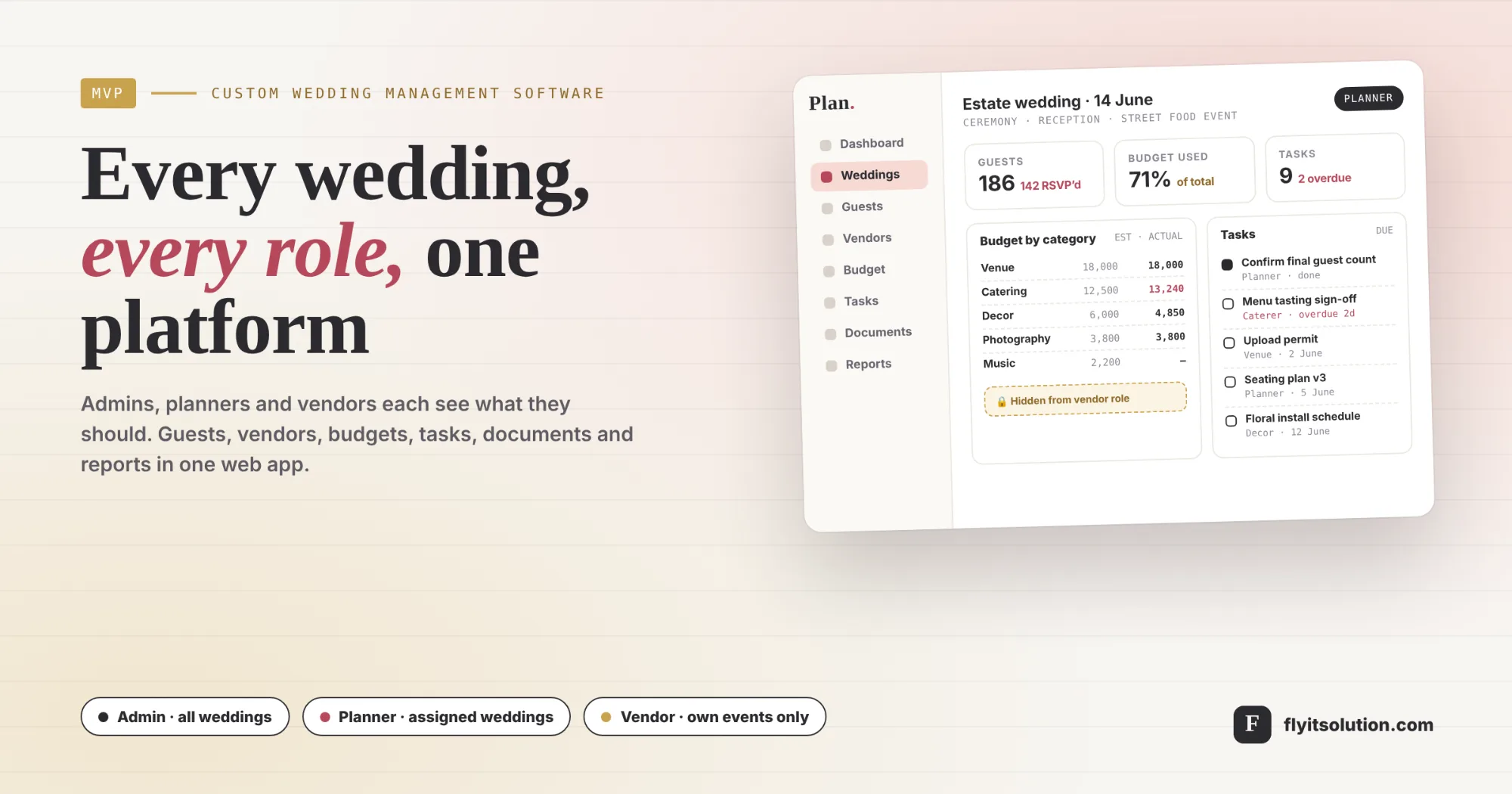
Custom wedding management software is a web application that runs every wedding a planning business handles from one place, with each person seeing only what their role allows. We recently built one as an MVP for a business that runs two wedding formats, estate weddings and CF weddings, with an owner, several planners and outside vendors working on each.
The brief was specific: digitalize every planning workflow, from event setup and vendor coordination to guest tracking, budgeting and timelines, and do it for three roles with different rights. This post explains the problems the brief set out to solve, the ten modules we built, how access works, the data model underneath, and what we deliberately left for a later release.
If you are weighing a build like this, the commercial side is on our MVP software development page; the rest of this post is the substance.
The problems the brief set out to solve
Five situations drove the specification, and each one maps to a module.
Planning lived in spreadsheets, email threads and shared drives.
Each wedding had its own set, and nobody could see all weddings at once. The fix is one application where every wedding, event, guest, vendor, task and document is a record with an owner.
Vendors needed access without seeing everything.
A caterer should see the reception details and their own tasks, not the budget or the guest list. The fix is a vendor role scoped to assigned events, with budgets and guest data excluded at the permission level.
RSVPs and dietary preferences were tracked by hand.
Counts for the venue and the caterer were re-done before every event. The fix is a guest module with RSVP status and dietary preference per guest, filters by event or table, and export to Excel or PDF.
Estimated costs and actual costs were never side by side.
Overspend showed up at the end. The fix is a budget module with categories, an estimated and an actual figure per expense, and charts generated from them.
Tasks slipped because nobody owned the reminder.
A deliverable was late when the person who remembered it was busy. The fix is tasks per wedding or event with an assignee, a due date and a status, with overdue reminders and a calendar view.
Three roles and what each one can do
Role-based access control is the core of the platform, and it is enforced on the server, not only in the interface. The matrix below is the specification as built.
| Capability | Admin | Planner | Vendor |
|---|---|---|---|
| Create planners and vendors | Yes | No | No |
| Invite users and assign roles | Yes | No | No |
| Weddings and events | All weddings | Assigned weddings | Assigned events, view only |
| Guests and RSVPs | All | Assigned weddings | No access |
| Vendors, contracts, payments | All | Assigned weddings | Own tasks and progress |
| Budgets and expenses | All | Assigned weddings | No access |
| Tasks | All | Create and assign | Mark own tasks complete |
| Documents | All | Upload per wedding | Upload to assigned events |
| Reports and analytics | All, with filters | Own weddings | No access |
| System settings and approvals | Yes | No | No |
Each role lands on its own dashboard after login. The admin sees all weddings, a revenue summary and active users; the planner sees upcoming events, pending tasks and a budget snapshot; the vendor sees assigned tasks and upcoming event timelines.
What we built the ten modules
The platform has ten modules, each with full create, read, update and delete operations, secure authentication and role checks.
1. Authentication and role management. Email and password login with password reset, multi-role authentication for admin, planner and vendor, and admin invitations that assign a role on sign-up.
2. Dashboards. A different dashboard per role, built from live data rather than a static summary page.
3. Wedding and event management. Multiple weddings, each tagged estate or CF, each holding multiple events such as the ceremony, the reception or a street food event. Fields: wedding name, type, date, venue, guest capacity and description, with document and image uploads.
4. Guest management. Add or import guest lists, track RSVP status and dietary preferences, filter by event or table, and export to Excel or PDF.
5. Vendor management. Add vendors by service type such as catering, decor, music or photography, assign them to specific events, track payments and upload contracts. Vendors see their assigned tasks and update progress.
6. Budget and expense tracking. A total budget per wedding, categories such as venue, decor, catering and photography, estimated versus actual cost per expense, and summary and analytics charts.
7. Timeline and task scheduling. Tasks per wedding or event with name, assignee, due date and status; automatic reminders for overdue tasks; a calendar view of milestones and deliverables.
8. Document management. Contracts, invoices and permits uploaded and attached to a wedding, an event or a vendor, with download and in-app preview.
9. Notes and communication. Internal notes and comments per wedding or event, with @mentions to tag team members planned as an enhancement.
10. Reports and analytics. Auto-generated guest summary, budget overview and vendor status reports, exportable as PDF or Excel and filterable by wedding type or date.
The interface follows the brief's design requirements: a clean dashboard with sidebar navigation to every module, a responsive layout for tablet and phone, and a white and grey base with gold and blush highlights. It was delivered through our custom web and mobile app development service.
The data model underneath
Eight models carry the whole platform, and getting them agreed before any screen was designed is what kept the build short.
| Model | Fields |
|---|---|
| User | id, name, email, password, role (Admin, Planner, Vendor) |
| Wedding | id, name, type, date, venue, planner_id, budget, notes |
| Event | id, wedding_id, name, date, venue, description |
| Guest | id, wedding_id, name, email, rsvp_status, dietary_preference |
| Vendor | id, wedding_id, name, service_type, contact_info, cost, status |
| Task | id, wedding_id, assigned_to, name, due_date, status |
| Expense | id, wedding_id, category, estimated_cost, actual_cost |
| Document | id, wedding_id, file_name, file_url, uploaded_by |
Two decisions in this model matter more than the rest. The wedding is the container and the event is a child of it, so guests and budgets belong to the wedding while vendors and tasks can be narrowed to an event. And the vendor role is a user with a role value, not a separate login system, so the same permission layer governs everyone.
How one wedding moves through the platform
A wedding takes six steps from creation to its final report, and a different role performs most of them.
1. The admin invites a planner and assigns the role; the planner signs in to a dashboard that is empty until a wedding is assigned.
2. The planner creates the wedding with its type, date, venue and capacity, then adds its events, uploads the venue contract and sets the total budget with its categories.
3. Guests are imported and RSVP status and dietary preferences are kept current as replies arrive; the list is filtered by event and exported for the caterer.
4. Vendors are added and assigned to events with contracts uploaded and payments tracked; each vendor signs in and sees only their events and tasks.
5. Tasks run to the calendar with assignees and due dates; overdue tasks trigger reminders, and vendors mark their own tasks complete.
6. Reports close the wedding with the guest summary, budget overview and vendor status exported as PDF or Excel, and the admin's revenue summary updated.
What we left for a later release, and why
An MVP is defined as much by what it excludes as by what it includes. Three items in the brief were marked optional, and we treated them that way: automatic reminders beyond overdue tasks, @mentions in notes, and in-app notifications. Each is useful, and none is needed to run a wedding, so they follow once the core modules are in daily use and the team knows which reminders it actually wants.
The same logic applies to turning the platform into a product. The role model and the wedding-and-event structure are the parts a multi-tenant product needs, so the path to a SaaS software development phase, where each planning business has its own admin, planners and vendors, is open without rework. We cover the sequencing in build a SaaS MVP in six weeks.
How this compares with an event ticketing platform
Wedding management and event ticketing are different products that are often confused. A wedding platform manages a private event's guests, vendors and budget for the planning team; a ticketing platform sells seats to the public and checks them in at the door. Businesses that run public events alongside weddings can pair this kind of build with our white-label event listing and ticketing platform rather than stretching one system to do both.
How to scope a wedding management MVP
If you are planning a similar build, these six steps are the ones that saved the most time on this one.
1. List who touches a wedding and what each person may see. Write down every role, usually the owner or admin, the planners and the vendors, and for each one what they create, what they edit and what they must never see. In this build vendors can see event details, documents and their own tasks but never budgets or guest lists, and that rule shaped the whole data model.
2. Separate the wedding from its events. A wedding is the container: name, type, date, venue, capacity, planner and budget. The ceremony, reception and any other function are events inside it, each with its own date and venue. Guests, vendors, tasks and documents attach to the wedding, and vendors and tasks can be narrowed to an event.
3. Decide the fields before the screens. Agree the data models first: user, wedding, event, guest, vendor, task, expense and document, with the fields each one carries. Screens built on an agreed model are quick to change; a model changed after the screens exist is expensive.
4. Pick the three numbers each dashboard shows. An admin sees all weddings, a revenue summary and active users; a planner sees upcoming events, pending tasks and a budget snapshot; a vendor sees assigned tasks and upcoming timelines. Three numbers per role is enough for a first release and keeps the dashboards honest.
5. Build CRUD, roles, uploads and exports before anything clever. Every module needs create, read, update and delete, role-based access on the server, file upload for documents and images, and export of guest lists and reports to Excel or PDF. Reminders, @mentions and notifications are marked optional and come after the core is in daily use.
6. Run one real wedding through it before the rest. Load one live wedding with its guests, vendors, budget and tasks, let the planner and one vendor work in it for two weeks, and fix what they trip over. Only then migrate the remaining weddings.
Working with Fly IT Solution on a platform like this
Projects start within 48 hours of agreement, with weekly progress reports, fixed-price or hourly billing, a written quote within 24 hours of a free consultation, and full ownership of the code. Our MVP engagements typically run four to six weeks; the guide to choose an MVP development company lists the questions to ask any vendor, including us.
Planning businesses that already have a product team can hire dedicated developers to extend it instead. Either way, the first step is a conversation about your roles and your weddings: talk to us about your platform, or book a free consultation and bring one wedding's spreadsheets with you.
Frequently asked questions
What is wedding management software?
Wedding management software is a web application a planning business uses to run every wedding from one place: the weddings and their events, guest lists with RSVP status and dietary preferences, vendors with contracts and payments, budgets with estimated and actual costs, tasks with due dates and reminders, documents, notes and reports. A multi-user version gives admins, planners and vendors their own logins and shows each role only what it is allowed to see.
Why build custom wedding planner software instead of using an off-the-shelf tool?
Build custom when the business runs more than one wedding format and needs reports filtered by type, when vendors must log in without seeing budgets or guest data, when several planners work on separate weddings under one admin, or when the business wants to own the platform rather than pay per user. Off-the-shelf planner tools suit a single planner managing their own weddings and usually stop at that.
What roles does a multi-user wedding management platform need?
Three roles cover most planning businesses: an admin creates and manages planners and vendors, has full access to every wedding, module and report, and controls system settings and approvals. A planner creates and manages assigned weddings and events, including guests, vendors, budgets, tasks, documents and notes. A vendor sees only assigned events, can view event details, upload documents and mark tasks complete, and cannot open budgets or guest lists.
How does guest and RSVP management work in the platform?
Planners add guests one at a time or import a list, then track each guest's RSVP status and dietary preference. Guests can be filtered by event or table, and the list exports to Excel or PDF for the venue, the caterer or the seating plan. Vendors never see the guest list.
How does the budget module track estimated versus actual costs?
Each wedding has a total budget split into categories such as venue, decor, catering and photography. Every expense carries an estimated cost and an actual cost, so the difference is visible per category and for the wedding as a whole, and the budget overview report and its charts are generated from those figures rather than maintained by hand.
How long does a wedding management MVP take to build?
A first release with authentication and roles, dashboards, weddings and events, guests, vendors, budgets, tasks, documents, notes and reports, all with full create, read, update and delete, is a typical MVP scope. Our MVP engagements usually run four to six weeks, with weekly progress reports and a written quote within 24 hours of a free consultation. Optional items such as automatic reminders and @mentions are scheduled after the core is in daily use.
Can the platform be turned into a product for other planners?
Yes. The role model, the wedding-and-event structure and the per-role dashboards are the parts a multi-tenant product needs, so the MVP can be extended into a SaaS platform where each planning business has its own admin, planners, vendors and data. That is a separate phase with its own scope for tenancy, billing and onboarding.