Short answer
Build a custom WordPress plugin when your workflow is genuinely specific to your business, when you're paying for three plugins to fake one process, or when an existing plugin does 80% of the job and the missing 20% is the part that matters. Don't build one when a well-maintained plugin already solves it that's usually cheaper and safer. A focused single-purpose plugin typically takes 2-4 weeks, a standard business plugin 4-8 weeks, and a complex one with third-party integrations 8-14 weeks.
I once audited a site running 27 active plugins.
Four of them did roughly the same thing. Two hadn't been updated since 2019. One was a premium plugin whose licence had lapsed, so it had quietly stopped receiving security patches while continuing to run. The client's actual requirement take a booking, check staff availability, send a specific confirmation was being held together by three plugins and a snippet someone had passed into functions.php.
Every WordPress update was a small crisis. Not because WordPress is fragile, but because nobody owned that stack.
That site didn't need another plugin. It needed one plugin that did the actual job.
This is the decision most businesses get wrong, in both directions building custom when something off-the-shelf would have been fine or bolting on a fifth plugin when the honest answer is that the workflow needs its own code. Here's how to tell which side you're on.
First, the part nobody wants to hear about plugins
Plugins are WordPress's greatest strength and its largest attack surface. Both things are true.
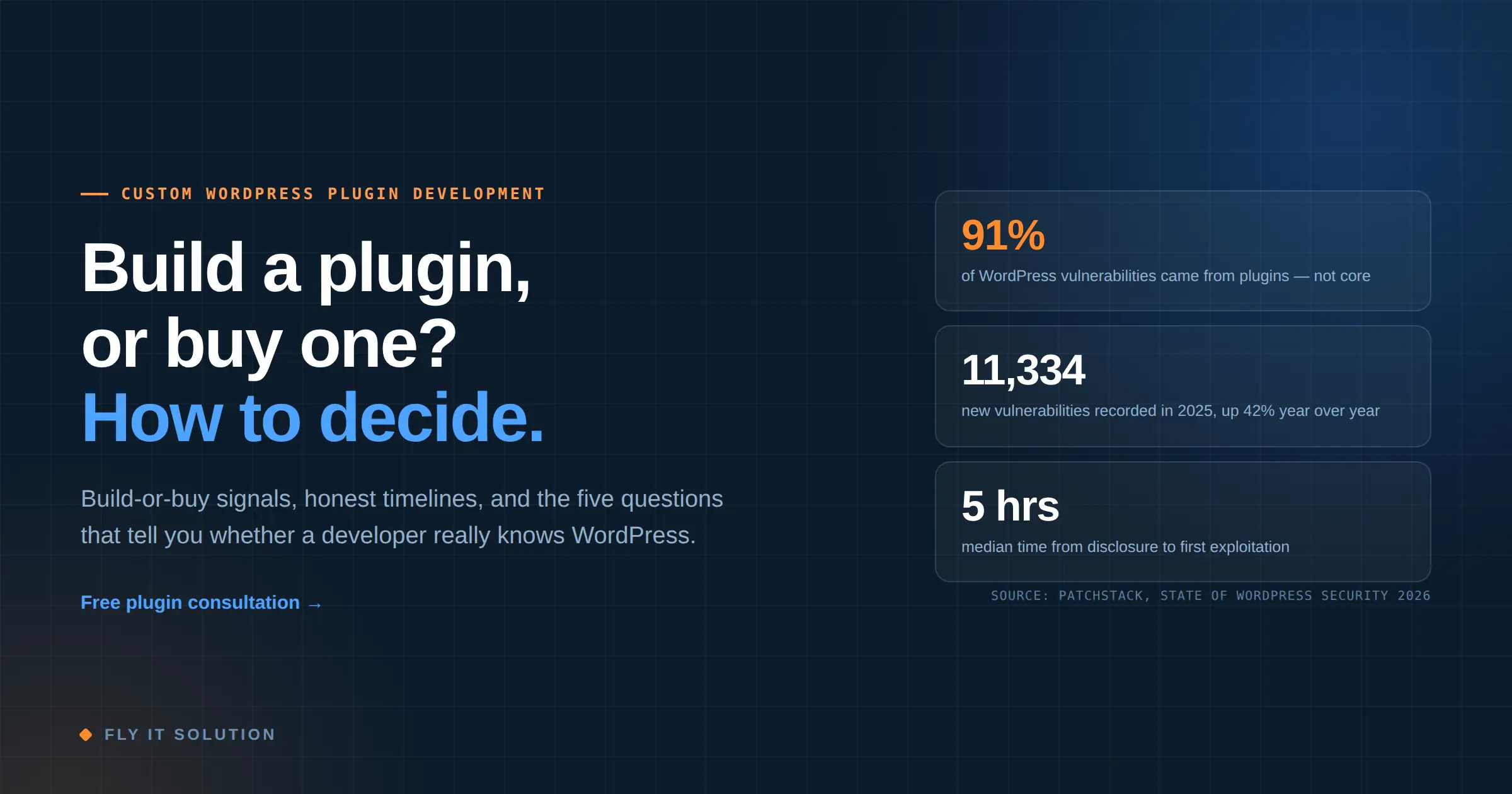
Patchstack's State of WordPress Security in 2026 report recorded 11,334 new WordPress vulnerabilities in 2025 a 42% rise on the previous year and 91% of them came from plugins. WordPress core accounted for six. Six, out of eleven thousand.
The timing data is the part that should change how you think about maintenance. The weighted median time from public disclosure to first exploitation was five hours. Forty-five percent were exploited within a day. And 46% had no fix available now they were disclosed (Patchstack).
One more finding worth sitting with premium and freemium products had roughly three times more known exploited vulnerabilities than free alternatives. Paying for a plugin buys you support. It does not buy you safety.
None of this means plugins are bad. It means every plugin you install is a dependency you don't control, running with full access to your database. Twenty-seven of them is twenty-seven bets on other people's release schedules.
That's the real argument for custom WordPress plugin development, and it isn't “custom code is more secure.” Badly written custom code is worse. The argument is surface area and ownership: fewer moving parts, and someone accountable for the ones that remain.
Four signs you've outgrown off-the-shelf
1. You're paying for three plugins to fake one process. A form plugin, a spreadsheet sync, and an email automation tool, held together by a Zapier account. Each has a subscription. Each is a failure point. The workflow exists in nobody's code.
2. The plugin does 80% and the missing 20% is the point. This is the most common one. The reporting is close but not what your finance team needs. The checkout works but not for your pricing model. You've been told to change your process to fit the plugin and your process is the thing that makes you money.
3. Your workarounds have workarounds. Someone maintains a spreadsheet to correct what the plugin produces. Support staff know a sequence of steps to get around a limitation. That knowledge is undocumented and lives in about two people.
4. Updates frighten you. If nobody is willing to run WordPress updates without a full manual test, you've accumulated dependencies you can't reason about. That's a maintenance problem that only compounds.
Two or more of these, and it's worth a conversation. Four, and you're already paying for the build in subscriptions, staff time and risk.
When you should not build a custom plugin
I'd rather say this plainly than sell you something.
Don't build custom when a well-maintained plugin already does the job. If WooCommerce, Gravity Forms, or a plugin with a real team behind it solves your requirement, use it. You get years of edge cases already handled, and a security team you're not paying for directly.
Don't build customs to save a subscription fee. A $200-a-year plugin costs less than any custom build plus its ongoing maintenance. The maths only works when the plugin genuinely can't do the job, not when it's mildly annoying.
Don't build custom before you've tried configuration. A surprising number of “we need custom development” conversations end with a setting nobody found, or a hook the existing plugin already exposes.
Don't build custom if nobody will own it afterwards. A bespoke plugin with no maintenance arrangement becomes exactly the abandoned dependency you were trying to avoid except now it's yours.
A reputable WordPress plugin development company will tell you this before quoting. If they don't, notice.
What separates a plugin that works from one built properly
Anyone can ship a plugin that works on launch day. The difference shows up at the first WordPress update, or the first time someone hostile finds your site.
Here's what to look for and these are the things worth asking a developer about directly, because the answers are hard to fake.
Hooks, never core hacks. The plugin should extend WordPress through actions and filters. If a developer modifies WordPress core files or edits your theme directly, the next update erases the work. This is non-negotiable and it's the fastest way to identify someone who doesn't work in WordPress often.
The four security fundamentals. WordPress's own developer handbook is unambiguous about these: check user capabilities, validate and sanitise input, escape output, and use nonces on forms and actions. Database queries go through $wpdb->prepare(). A developer who can recite these without pausing has written WordPress code for real; one who talks vaguely about “following best practice” may not have.
Uninstall cleanup. When the plugin is deleted, does it remove its options and tables? Most don't. Years of dead rows in wp_options is how sites get slow for reasons nobody can trace.
No autoloaded bloat. Options that don't need loading on every page request shouldn't be autoloaded. This is a small detail with a measurable effect on every single page load.
Translation-ready and prefixed. Text strings wrapped for translation, and every function, class and option prefixed uniquely so it can't collide with another plugin. Collisions cause bugs that look random and take days to find.
Documentation and a handover. You should receive readable code, a README, and enough documentation that a different developer could take it over. If you can't switch suppliers, you don't own it regardless of what the contract says.
Custom build, customise, or fork?
Three different jobs that get lumped together, with very different risk profiles.
| APPROACH | BEST FOR | WATCH OUT FOR |
|---|---|---|
| Custom plugin from scratch | Workflow specific to your business; no good existing option | Costs more upfront; you own maintenance |
| Extend an existing plugin | Good plugin, missing one piece | Only safe via the plugin's own hooks never by editing its files |
| Fork an existing plugin | Plugin abandoned but the code is sound | You inherit every bug and every future security fix |
The middle option is the one most people should consider first and usually don't know exists. A well-built plugin exposes hooks precisely so you can add behaviour in a separate add-on plugin that survives updates. If WooCommerce nearly does what you need, a small companion plugin is often the right answer cheaper than a rebuild and safer than editing WooCommerce itself.
Editing another plugin's files directly is the one option that's never right. The next update overwrites your changes, and you'll be told the plugin broke.
What custom WordPress plugin development costs and how long it takes
Honest ranges. Treat anything far outside them as a reason to ask more questions.
| SCOPE | TIMELINE | EXAMPLE |
|---|---|---|
| Focused single-purpose plugin | 2–4 weeks | Custom post type with admin screens, a specific calculator, a targeted WooCommerce tweak |
| Standard business plugin | 4–8 weeks | Multi-step workflow, custom database tables, role-based permissions, admin dashboard, exports |
| Complex or integrated plugin | 8–14 weeks | Third-party API integrations, payment or shipping logic, white-label distribution, multisite |
What actually moves the estimate: the number of third-party integrations, whether it must work across multiple themes, whether you need a licensing or update server for distribution, and how much admin interface is required. Screen count matters less than integration count.
Then budget for maintenance. WordPress ships major releases regularly, PHP versions move, and dependencies shift. A plugin with no maintenance plan has a shelf life of about two years.
Five questions for any WordPress plugin development service
Take these into your next call. The specificity of the answers tells you more than any portfolio.
1. “Will this survive a WordPress core update, and how do you guarantee that?” You want to hear about hooks and filters, and about testing against release candidates.
2. “Who owns the code, and do I get the repository?” The answer should be you, in full, with no license fees. Get it written down.
3. “How do you handle sanitisation, escaping and nonces?” Listen for whether it's fluent or improvised.
4. “What happens when the plugin is uninstalled?” A blank look here tells you how much they think about long-term consequences.
5. “What does year two cost?” Anyone who has supported plugins in production has a number.
And one that isn't a question: ask them to look at your requirement and tell you whether an existing plugin already solves it. How they answer that is the most informative thing you'll learn all call.
What this looked like on a real project
An HR trainer was running employee assessments through Google Forms, with results spread across several spreadsheets. Each assessment cycle meant re-creating forms, chasing responses, and manually assembling improvement plans.
We replaced the lot with a single WordPress plugin: an assessment builder native to WordPress rather than dependent on a third-party form service, an employee intake system, an improvement-plan workflow with its own dashboard, and an admin panel to manage invitations and reviews.
The interesting decision was to build the assessment engine natively instead of wrapping an existing forms plugin. It was more work upfront. But it meant the assessment data lived in a structure designed for the reporting they needed, rather than in generic form entries that would need transforming forever after. Wrapping a form plugin would have shipped two weeks sooner and created a permanent tax on every report.
That's usually where the real decision sits in custom plugin work not “can this be built” but “what will this cost us every month for the next three years.”
Frequently asked questions
What is custom WordPress plugin development?
It's building a plugin specifically for your site's requirements instead of using an off-the-shelf one from the plugin directory. The plugin extends WordPress through its official hooks and filters, so it survives core updates, and the code belongs to you with no license fees or vendor lock-in.
How much does a custom WordPress plugin cost?
Cost tracks scope and timeline. A focused single-purpose plugin typically takes 2–4 weeks, a standard business plugin 4–8 weeks, and a complex plugin with third-party integrations 8–14 weeks. The biggest cost drivers are the number of integrations and the amount of admin interface, not the number of screens.
Will a custom plugin break when WordPress updates?
Not if it's built correctly. A plugin that extends WordPress through documented hooks and filters, without modifying core or theme files, survives updates. Plugins break when developers hack core, rely on undocumented internals, or edit another plugin's files directly.
Can you modify an existing WordPress plugin instead of building a new one?
Often yes, and it's frequently the cheaper answer. The safe method is a small companion plugin that uses the existing plugin's own hooks. Editing the plugin's files directly is never safe the next update overwrites your changes.
Who owns the code in custom WordPress plugin development?
You should own it outright, including the source repository, with no ongoing licence fees. Confirm this in the contract before work starts, along with what documentation you receive at handover.
How do I choose a WordPress plugin development company?
Judge them on how they answer technical questions rather than on portfolio screenshots. Ask about update-safety, sanitisation and escaping, uninstall behaviour, and code ownership. The strongest signal is whether they're willing to tell you an existing plugin already solves your problem.
The bottom line
The best outcome from custom WordPress plugin isn't a new feature. It's a shorter plugin list, a workflow that finally matches how your business runs, and someone accountable when WordPress updates next month.
If you're weighing this up, the cheapest useful step is having someone look at what you're running now and tell you honestly whether the answer is a build, a configuration change, or a small companion plugin.
| Get a free plugin consultation → |
|---|
Fly IT Solution has built custom WordPress plugins, WooCommerce extensions and white-label plugin products for more than a decade, working from Mohali, India and Minneapolis, USA, across healthcare, e-commerce, finance, EdTech and logistics. We build to the official WordPress Plugin Handbook standards sanitised inputs, escaped outputs, nonces and capability checks and we don't touch core. The observations above come from plugins we've shipped and sites we've been asked to rescue.
Sources: Patchstack, State of WordPress Security in 2026; WordPress Plugin Handbook, Security chapter (developer.wordpress.org).