To deploy a no-code app to production you need four things in place: a domain with the right DNS records, a host (the platform's own publishing or your own server), a GitHub repository that holds the code, and a pre-launch check of database rules, secrets and sign-in on the live domain. The build tool gets you to a working app; these four get you to a safe, public one.
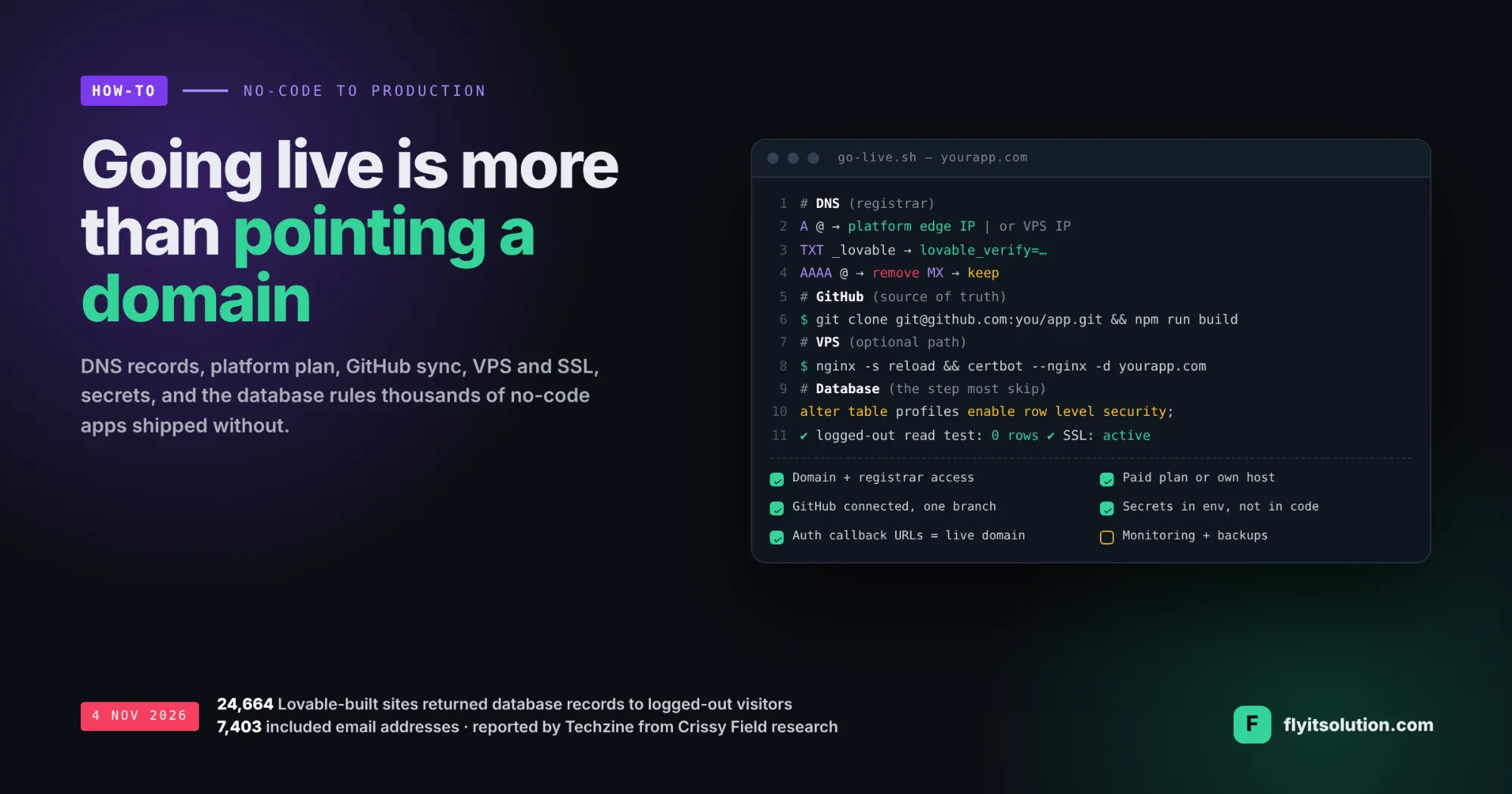
The last item is the one that made news this week. On 4 November Techzine reported research by the German security firm Crissy Field that identified 159,041 Lovable-built projects and found 24,664 of them returning database records to visitors who had not logged in, 7,403 of those including email addresses, because the Supabase databases behind them had no access rules; the figures are from Techzine's report , which notes they are not a confirmed breach rate.
A day earlier CrowdStrike announced an integration that brings Lovable workspaces into its Falcon Shield product to flag exposed apps, stored secrets and missing security scans, per CrowdStrike's announcement. Going live has become a security event, not just a DNS change.
This post uses Lovable as the worked example because it is the platform in the news; the steps apply to any no-code or AI builder. It covers what you need before you start, the two deployment paths, the exact records, the security step, and seven steps in order.
What you need before you go live
Going live needs accounts and access more than it needs code. Collect these first, because each one blocks a step later.
| You need | Why |
|---|---|
| A domain and registrar login | You will add or change DNS records; without registrar access nothing else proceeds. |
| The platform plan that allows custom domains | On Lovable, publishing works on all plans but a custom domain needs a paid plan, per its documentation. |
| A GitHub account | The platform creates a repository for the project; it becomes the source of truth and the route to any other host. |
| A server or hosting account, if self-hosting | A VPS (Ubuntu, Nginx, Node) or a static host; plus the time to patch and monitor it. |
| Database and auth access | Supabase or equivalent: you must be able to turn on row-level security and set allowed callback URLs. |
| Production secrets | API keys, database URL and auth settings for production, stored as environment variables, never in front-end code. |
| Analytics, Search Console, uptime monitoring, backups | The things you want on day one and cannot add retroactively. |
Path A: publish on the platform with your own domain
Publishing on Lovable puts the app on a lovable.app subdomain, and a custom domain replaces that address with your own. The sequence is publish, connect the domain, wait for verification, test.
Connect a domain you already own by adding two records at your registrar, per Lovable's custom domain documentation an A record for the domain (host @, or the subdomain label) pointing to Lovable's edge IP, 185.158.133.1 at the time of writing, and a TXT record at lovable whose value begins with lovableverify=. Remove any AAAA record for the same name.
If you route through Cloudflare or a similar proxy, a CNAME to the project's lovable.app address replaces the A record, and the TXT record is not required. Either way, SSL is issued automatically once verification passes, and DNS changes can take up to 72 hours to propagate, though most are live within hours.
Two details catch people. The first domain you connect becomes primary and other connected domains redirect to it with a 302, so connect the one you want to keep first. And changes are not published automatically; you publish each time.
The platform path is right when you want the least operations work and are happy to stay on the platform's hosting and plan. Confirm the current records in the documentation before you edit anything; providers change them.
Path B: GitHub to your own VPS or host
Deploying from GitHub gives you the code on infrastructure you control, with the platform still usable as the editor. It starts with the GitHub connection.
Each Lovable project connects to one repository, created new and private by default, and syncs one branch at a time, usually main, per Lovable's GitHub documentation. Edits in Lovable commit to GitHub, and commits pushed to the active branch sync back into Lovable; if both sides have changed, Lovable pushes its work to a lovable-sync branch for you to merge. It cannot attach to an existing repository, so start the connection from the project.
From there the deployment is ordinary web hosting. Clone the repository to the server, install dependencies, build the front end, and serve the built files with Nginx; point an A record at the server's IP, install a Let's Encrypt certificate, and redirect HTTP to HTTPS.
The hosted database and auth provider stay where they are; only the front end moves. Set production environment variables on the server, add the live domain to the auth provider's allowed URLs, and never commit secrets to the repository.
Choose this path when you need your own infrastructure, a region, a corporate network, or a cost model the platform plan does not offer, and when someone will patch and monitor the server. A VPS that nobody maintains is a liability, not an asset.
The step the exposed apps skipped: database access rules
Row-level security is what stops a visitor from reading every row in a table through the public API. The research reported this week describes exactly that failure: records returned on page load to anyone, because no policy said otherwise.
Before the app is public, turn on row-level security on every table and write a policy for each role: what a logged-out visitor may read (usually nothing), what a signed-in user may read and write (usually their own rows), and what an admin may do. Then test it the only way that counts, by opening the live site in a private window and trying to read data without signing in.
Do the same for secrets. A key in the front-end bundle is public; move it to the server or an edge function, and rotate any key that has ever been in the browser.
Which path should you choose?
| Factor | Publish on the platform | GitHub to your own host |
|---|---|---|
| Setup time | Hours | A day, plus ongoing maintenance |
| Plan required | Paid plan for a custom domain | Any plan; you pay for hosting instead |
| Control | Platform hosting and settings | Your server, region, network, cost |
| Updates | Publish from the editor | Pull from GitHub and rebuild, or automate it |
| Who maintains it | The platform | You, or a partner |
| Best for | MVPs, internal tools, fast launches | Regulated data, custom infrastructure, teams with DevOps |
Most first launches belong on the platform, with the GitHub connection made on day one so the move to your own host is a decision rather than a migration. The build-versus-platform question itself is covered in Lovable vs WordPress and in build a SaaS MVP in six weeks.
Seven steps to take a no-code app live
1. Lock down the database before anything is public. Turn on row-level security on every table and write a policy for each role, then test as a logged-out user. This is the step the exposed apps skipped.
2. Connect GitHub so the code has a home. Connect the project to GitHub from the platform; it creates a private repository and syncs one branch, usually main. From now on the repository is the source of truth, whichever host you choose.
3. Choose the host and the plan that goes with it. Publishing on the platform works on every plan, but a custom domain needs a paid plan. Self-hosting needs a VPS or a static host plus the time to set it up and keep it patched.
4. Set the DNS records at your registrar. For the platform: an A record to its edge IP and a TXT record for verification, or a CNAME in proxy mode, with any AAAA record removed. For a VPS: an A record to the server's IP. Keep MX records untouched so email keeps working.
5. Get a certificate and force HTTPS. The platform issues SSL automatically once DNS verifies. On a VPS, install a certificate with Let's Encrypt and redirect HTTP to HTTPS in the web server.
6. Move secrets and environment settings to production. API keys, the database URL and auth callback URLs must point at production and never sit in the front-end code. Add the live domain to the auth provider's allowed URLs.
7. Test as a stranger, then connect monitoring. Open the live domain in a private window, sign up, sign in, do the main task, and check what a logged-out visitor can read. Then connect Google Search Console, analytics, uptime monitoring and a backup schedule.
Need it done this week? Our go-live service
We take no-code and AI-built apps to production as a fixed-scope engagement through our no-code and low-code development services: database access rules and a hardening review, GitHub setup, DNS and SSL, platform publishing or VPS deployment, environment secrets, monitoring and backups, and a written handover.
It starts within 48 hours of agreement, with a written quote within 24 hours of a free consultation, and you keep the repository, the server and the accounts in your name. If the app has outgrown the builder, the same team continues it as custom web and mobile app development or scopes the next version as MVP software development; teams that want capacity rather than a project can hire dedicated developers.
Send us the project link and the domain, and book a free go-live review. We will tell you within one business day what is exposed, what is missing, and what the go-live service would cover for your app.
Frequently asked questions
What do I need before taking a no-code app live?
A domain you control, access to its DNS at the registrar, a platform plan that allows custom domains if you publish on the platform, a GitHub account for the repository, a server or hosting account if you deploy yourself, a database with access rules turned on, production values for every secret and callback URL, and a short test plan for the live site.
Do I need a paid Lovable plan to go live?
Publishing to the platform's own subdomain works on all plans, according to Lovable's documentation, but connecting a custom domain requires a paid plan. If you deploy from the GitHub repository to your own server instead, the domain is yours to point wherever you like.
Which DNS records does a Lovable custom domain need?
In the standard setup, an A record for the domain pointing to Lovable's edge IP and a TXT record at _lovable for verification; in proxy mode through Cloudflare or similar, a CNAME to the project's lovable.app address replaces the A record. Any AAAA record must be removed, SSL is issued automatically, and DNS changes can take up to 72 hours to propagate. Check the current values in Lovable's documentation before you edit records.
Can I deploy a Lovable app to my own VPS?
Yes: connect the project to GitHub, clone the repository to the server, build the front end, serve it with Nginx or another web server, point an A record at the server and add a Let's Encrypt certificate. The hosted database and auth provider stay where they are; only the front end moves. Changes you make on the server can be pushed back to the synced branch.
How does Lovable's GitHub sync work?
Each project connects to one repository, created new and private by default, and syncs one branch at a time, usually main. Edits in Lovable commit to GitHub, and commits pushed to the active branch sync back into Lovable; if both sides have changed, Lovable pushes its work to a lovable-sync branch for you to merge. It cannot attach to an existing repository.
Why did so many Lovable apps leak data, and how do I avoid it?
Research reported on 4 November 2026 found 24,664 Lovable-built sites returning database records to visitors who had not logged in, 7,403 of them including email addresses, because the Supabase databases behind them had no row-level security policies. The fix is to enable row-level security on every table, write a policy per role, keep secrets out of the front end, and test the live site as a logged-out user before launch.
Can Fly IT Solution take my no-code app live for me?
Yes. We handle the go-live for apps built on Lovable and similar platforms: database access rules, GitHub setup, DNS and SSL, platform publishing or VPS deployment, environment secrets, monitoring and backups, and a hardening review. It is a fixed-scope engagement that starts within 48 hours of agreement, with a written quote within 24 hours of a free consultation.