A client of ours runs a platform where field reps and an admin team sign contracts with each other, all day, every day. The obvious answer was a signing service. The obvious answer would have added a per-envelope fee to every one of those contracts, sent both parties out of the app to sign, and bought them exactly one thing they already had: certainty about who was signing.
So, we built signings into the application. Here is what that involves, why the decisions were made the way they were, what makes the result legally defensible, and because no honest article about this skips it when you should still pay DocuSign.
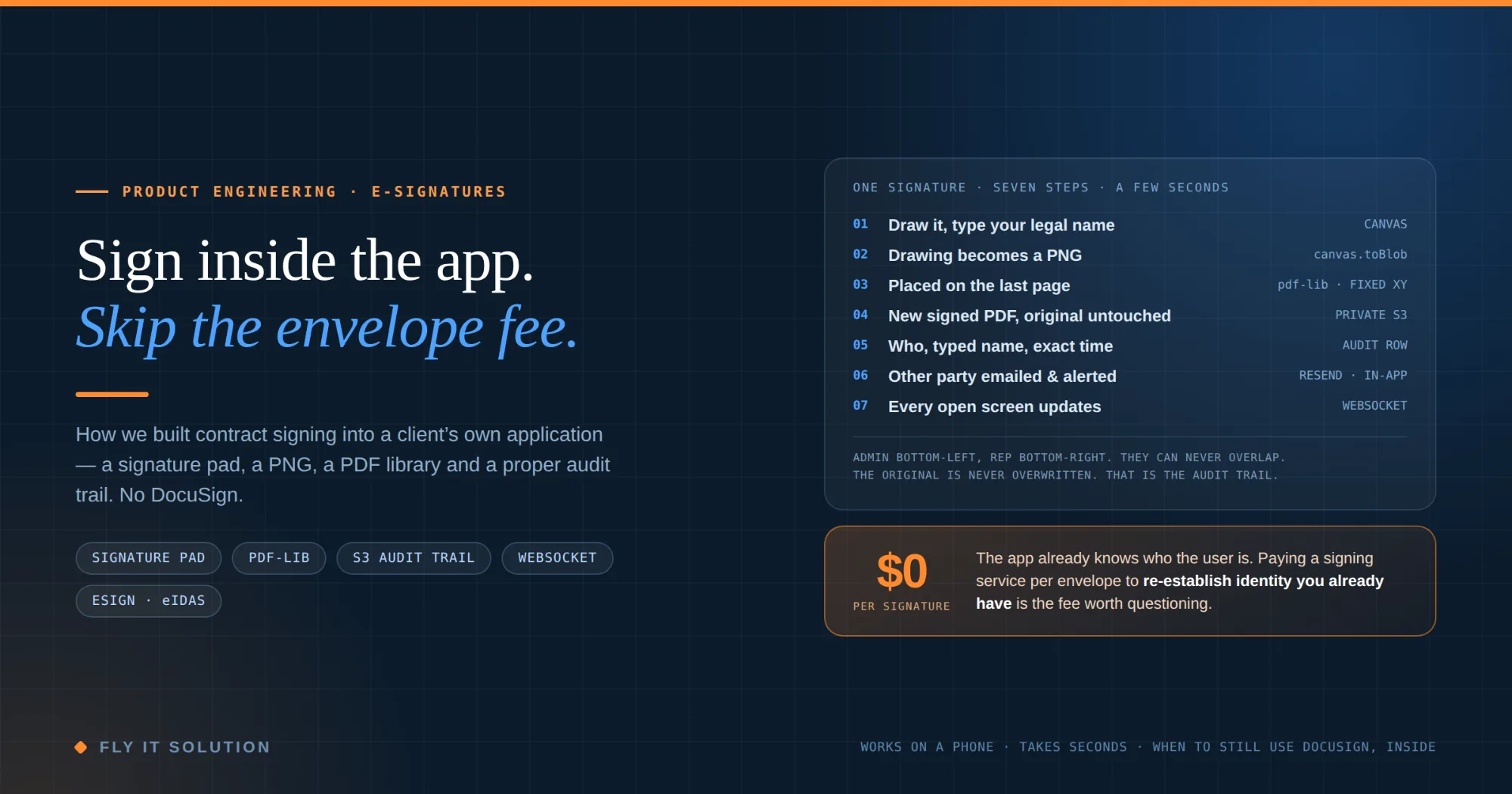
| If both signers are authenticated users of your own application signing your own standard contract, you can build e-signatures in rather than renting them. The user draws on a signature pad and types their legal name; the drawing becomes a PNG; a PDF library embeds it on the last page at a fixed position; a new signed PDF is saved while the original stays untouched; who signed and when is recorded; and the other party is notified. It takes seconds, works on a phone and costs nothing per signature. |
|---|
Why not just use DocuSign?
Because of what you are paying for. A signing service does three jobs: it establishes who the signer is, it captures their intent to sign, and it produces an evidence trail. For a contract between two strangers on the open internet, all three are hard and the fee is fair.
Inside an application with authenticated users, the first job is already done. The rep logged in. The admin logged in. Their accounts, roles and sessions are known. What is left capturing intent and building the evidence trail is a bound engineering task, and it is the same task whether you do it once for a hundred contracts or a hundred thousand. A per-envelope fee for that is paid by the glass for water you are already piping into the building.
There is also the workflow cost, which is easy to underrate. Every hand-off to an external signing service is a redirect, an email, a new tab and a login on the other side. Reps on a phone in a car park do not finish that flow. A signature pad on the contract screen they are already looking at, they do.
How the signature feature works, in seven steps
Here is the whole thing from the user's side, and then from the system's side.
| # | What the user sees | What the system does |
|---|---|---|
| 1 | Draws a signature in a box on the contract screen with a finger, stylus or mouse, and types their legal name next to it. Both are required. | A canvas component captures the strokes. The typed name is stored as a separate field it is the machine-readable identity; the drawing is the human one. |
| 2 | Nothing takes a fraction of a second. | The canvas is exported as a PNG image, straight from the browser, and converted to a data URL ready to embed. |
| 3 | Sees their signature appear on the last page of the contract. | A PDF library opens the contract in the browser and embeds the PNG at a fixed position admin bottom-left, rep bottom-right, about 25 points from the edge, aspect ratio preserved, with a small grey caption. |
| 4 | Nothing visible. | A new executed PDF is generated and stored in a private bucket. The original is never overwritten. The raw signature PNG is stored separately as evidence of exactly what was drawn. |
| 5 | The contract's status changes. | The database records who signed, the typed name and the exact timestamp for that party, and moves the status from pending to partially signed, then to signed when the second party completes. |
| 6 | The other party gets an email and an in-app alert. | A transactional email goes out automatically and an in-app notification is pushed to the counterparty. |
| 7 | Every dashboard that is open updates on its own. | A WebSocket message updates every connected screen, so nobody is looking at a stale status or refreshing to check. |
Seven steps, a few seconds, and the rep never left the screen.
The four decisions that matter
Most of the buildings are plumbing. Four choices carry the weight, and each was made for a business reason rather than a technical one.
Fixed coordinates, not field detection. The signature goes to a known position on the last page one party left, one party right rather than the system searching the PDF for a signature line. That sounds less clever, and it is; it is also why the two signatures can never overlap, never land on the wrong page, and never fail because a template was edited. The contracts here are the client's own templates, so the last page is known. Field detection is the right tool when the documents are not yours we use it in a separate engine that fills manufacturer forms, where the layout is unknown in advance. Using the simpler approach where it is sufficient is the whole point.
The original is never overwritten. Signing produces a new file. The unsigned contract, the executed contract and the raw signature image are three separate objects in storage. That is not tidiness; it is the audit trail. If anyone ever disputes what they signed, the unsigned version and the drawn signature exist independently of the executed document, which is worth more than any certificate.
A typed legal name alongside the drawing. A drawing is evidence of a person acting. A typed name is evidence of who they say they are, in the form a database can index and a court can read. Requiring both, from an authenticated account, with a timestamp, is what turns a picture into a signature.
The status only moves forward. Pending, partially signed, signed. There is no path back, and every transition fires the notifications. That is what lets the dashboard, the email and the in-app alert all agree about the state of a contract without anyone reconciling them.
Is a drawn signature legally valid?
This is the question every client asks, and the honest answer is: in most places, for most contracts, yes and what makes it hold up is the evidence around it, not the drawing itself.
United States. The federal ESIGN Act and the state-level UETA give electronic signatures the same legal effect as handwritten ones for most transactions. What they look for is intent to sign, agreement to do business electronically, a signature attached to or logically associated with the record, and a record that is retained and reproducible. Map that onto the build: the drawing and typed name are intent; using the platform is the agreement; embedding into the PDF is the association; the stored executed file, original and signature image are the retention.
European Union. Under eIDAS, a drawn signature of this kind is a simple electronic signature. The regulation says such a signature cannot be denied legal effect or admissibility solely because it is electronic. Higher assurance levels — advanced and qualified — exist for documents that require them, and a drawn signature is not one of those; if your contracts need a qualified signature, this approach is not enough and a certificate-based provider is the right call.
India. The Information Technology Act recognises electronic signatures through a certificate-based scheme, and a drawn image sits outside that scheme even though ordinary contract law can still make the agreement binding. Take local advice for Indian contracts rather than assuming the US or EU position carries over.
None of this is legal advice. It is a description of what was built and why the design choices line up with what those frameworks ask for. Have your own counsel confirm the position for your contracts and your jurisdictions.
When should you still use DocuSign
Four cases, and we would say so before quoting:
The other party is not a user of your application. External counterparties with no account are exactly the strangers a signing service exists to identify.
The document needs a qualified electronic signature, a notarisation, or a specific regulated signing process. Build does not cover that; a certificate-based provider does.
Your industry's regulator or your insurer expects a recognised third-party audit certificate, and the cost of arguing otherwise exceeds the fee.
You sign a handful of contracts a month. The build is bounded but it is not free, and below some volume the per-envelope fee is simply cheaper.
For a platform where the same two kinds of authenticated users sign the same kinds of contract all day, none of those apply, and building it in is the better decision on cost, on workflow and on control of the evidence.
What it costs to run
Nothing per signature, because nothing leaves the system. The running costs are object storage for the PDFs and signature images, which is cents a month at any realistic volume, and transactional email for the notifications, which the application was already sending. The build cost is real but bounded: a signature pad component, a PDF library, a storage bucket, a few database columns and the notification plumbing the application almost certainly already has. It works on a phone, because that is where the reps are.
FAQ
Can you build e-signatures into your own app instead of using DocuSign?
Yes, and for the common case - authenticated users in your own application signing your own standard contracts - it is usually the better choice. The app already knows who the user is, so you are not paying a signing service per envelope to establish identity you already have. A signature pad, a PNG of the drawing, a PDF library that embeds it, and a proper audit record are the whole build. Where a signing service still earns its fee is signing with external parties who have no account, documents that need a qualified or notarised signature, and regulated industries with their own rules.
How does an in-app signature get onto the PDF?
The user draws on a canvas with a finger, stylus or mouse. The drawing is exported from the canvas as a PNG image. A PDF library running in the browser opens the contract, embeds the PNG onto the last page at a fixed position - one party bottom-left, the other bottom-right, so they can never overlap - adds a grey caption, and saves a new file. The original PDF is never modified; the signed copy is a separate document stored alongside it.
Is a signature drawn on a PDF legally valid?
In the United States, the ESIGN Act and UETA give electronic signatures the same legal effect as handwritten ones for most contracts, provided the signer intended to sign, agreed to do business electronically, the signature is attached to the record, and the record is retained. In the European Union, eIDAS classes a drawn signature as a simple electronic signature and says it cannot be denied legal effect solely because it is electronic, though higher assurance levels exist for documents that require them. What makes a drawn signature defensible in practice is the evidence around it: a typed legal name, a timestamp, an unaltered original and the raw signature image kept separately. This is a description of what we built, not legal advice.
Why place the signature at a fixed position instead of detecting the signature field?
Because the contracts in this system are the company's own templates, the last page is known and the two parties' positions can be fixed by design - admin bottom-left, rep bottom-right - which guarantees they never overlap and removes an entire class of failure. Automatic field detection is the right tool when the documents are not yours; we use it in a separate engine that fills manufacturer forms, where the layout is unknown in advance. Using the simpler approach where it is sufficient is the whole point.
What should an e-signature audit trail record?
Who signed, identified by their authenticated account; the legal name they typed; the exact timestamp of each signature; the original unsigned document, never overwritten; the executed document as a separate file; and the raw signature image kept on its own as evidence of what was drawn. Alongside that, a status that moves only forward - pending, partially signed, signed - so the state of every contract is unambiguous, and notifications that go out at each transition, so the counterparty is never waiting on an email that was never sent.
What does an in-app signing feature cost to run?
There is no per-signature fee, because nothing is sent to a third-party signing service. Running costs are storage for the signed PDFs and signature images, which are measured in cents per month at any realistic volume, and transactional email for the notifications. The build itself is the cost, and it is a bounded one: a signature pad component, a PDF library, an object-storage bucket, a few database columns and the notification plumbing your application almost certainly already has.
Closing
If your application has authenticated users signing your own contracts, and you are paying by envelope to send them somewhere else to do it, that is worth a conversation. We build features like this and the audit trails underneath them from Mohali, India and Minneapolis, Minnesota, and we will tell you when a signing service is still the right answer.