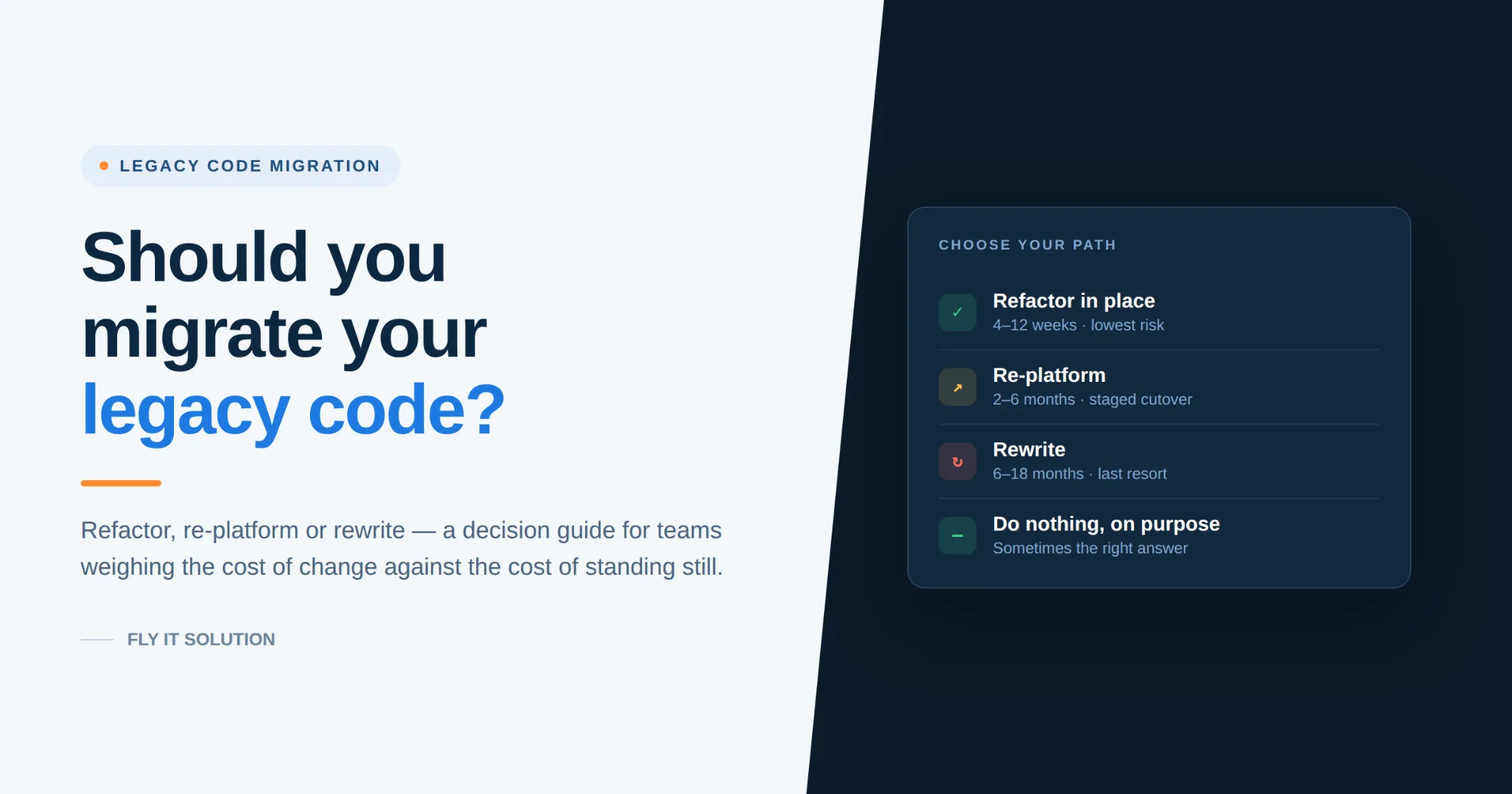
Migrate when the cost of keeping the system is measurably higher than the cost of changing it - not when the code simply looks old. For most teams that means starting with a two-week code audit, then choosing one of three paths: refactor in place (lowest risk), re-platform to a supported runtime or cloud (moderate), or rewrite the module (highest risk, reserved for systems that genuinely cannot be saved). A full rewrite of a working system is almost never the right first move.
I've sat in a lot of rooms where somebody says, "we need to rewrite this."
Usually, it's said with frustration. A release slipped. A hotfix broke something unrelated. The one developer who understood the billing module left in March. And rewriting sounds clean - a fresh repo, a modern framework, no ghosts.
Then eighteen months later the rewrite is 70% done, the old system is still in production because nobody could fully replicate what it does, and now the company maintains two codebases instead of one.
That outcome is common enough to have a name in our industry: the second-system effect. So, before you approve a migration budget, it's worth slowing down and asking a harder question than "is this code old?"
The better question is: what is this system costing us right now, and what would change if we fixed it?
This guide walks through how to answer that honestly.
Old code isn't the problem. Friction is.
Plenty of "legacy" systems run beautifully. There are PHP 5 applications quietly processing orders that haven't needed a developer in four years. If a system is stable, secure, cheap to run and nobody is waiting on it, age alone is not a business case.
Legacy becomes a real cost when it starts producing friction. And friction shows up in numbers you probably already have:
•Cycle time. How long does a small, well-understood change take from ticket to production? If a text change on an invoice takes three days, that's not a developer problem.
•Change failure rate. What percentage of deploys need a follow-up fix? Above roughly 15%, you're paying a fear tax on every release.
•Bus factor. How many people can safely change the payment logic? If the answer is one, you have an operational risk, not a technical one.
•Maintenance share. What proportion of your engineering hours goes to keeping things running versus building something new?
That last one is where most organisations get quietly eaten alive. The U.S. Government Accountability Office reported in 2023 that roughly 80% of the federal IT budget goes to operations and maintenance rather than development and modernization - with ten critical legacy systems alone costing about $337 million a year to keep breathing (GAO-23-106821). Private companies rarely measure it that precisely, but the pattern rhymes.
At a national scale, CISQ estimated the accumulated technical debt in U.S. software at around $1.52 trillion in its 2022 Cost of Poor Software Quality report. That number is abstract. Your version of it isn’t it's the feature your competitor shipped that you couldn't.
Six signs your system has crossed the line
Run through these. Two or more is worth a conversation. Four or more and you're already paying for a migration just in salaries instead of a project budget.
1. Simple changes take disproportionate time. A one-line business rule change requires touching six files and a full regression sweep, because there are no tests and no boundaries.
2. Your platform is past end of life. No security patches. This isn't a preference issue. Unpatched, publicly known vulnerabilities remain one of the most reliable entry points for attackers - Verizon's 2024 Data Breach Investigations Report found the use of vulnerability exploitation as an initial breach vector grew roughly 180% year over year. Running EOL software is an insurance and compliance problem before it's an engineering one.
3. Knowledge lives in one head. Or worse, in a head that has already left the company. If onboarding a competent developer to the codebase takes three months, you don't have documentation - you have folklore.
4. You can't integrate. The new payment provider, the analytics platform, the AI feature your board keeps asking about - all of it assumes a modern API surface. Your system exposes a SOAP endpoint and a nightly CSV drop.
5. Performance degrades predictably. Not "the server is slow" but "we know Tuesday afternoon will be bad." Scaling problems that everyone has learned to schedule around are technical debt with a calendar invite.
6. Audits are getting expensive. SOC 2, HIPAA, GDPR, PCI DSS - if your evidence-gathering is manual because the system can't produce the logs, the compliance cost compounds every year.
Notice that none of these are "the framework is out of fashion."
The three real options
Once you've decided something must change, there are three legitimate paths. Most successful projects use more than one, applied to different parts of the same system.
Refactor in place
You keep the language, framework and architecture, and improve the code underneath. Add tests. Extract the tangled service into named components. Delete the dead code - and there's always more dead code than anyone expects.
Best for: systems that are structurally sound but neglected. Teams that can't afford a freeze.
Risk: low.Typical duration: 4-12 weeks per major module.
Watch out for: refactoring without a test harness first. That's not refactoring, that's rewriting slowly.
Re-platform
The application logic largely survives; the ground beneath it changes. On premises to cloud. PHP 5.6 to PHP 8.x. AngularJS to Angular or React. An unsupported Zend app onto Laravel. Database engine migration with integrity verification on both sides.
Best for: EOL runtimes, hosting cost problems, scaling ceilings, compliance requirements you can't meet on current infrastructure.
Risk: moderate - and almost entirely concentrated in the cutover, which is why staged migration with a rollback plan matters more than the code itself.Typical duration: 2-6 months depending on integration surface.
Rewrite
A genuinely new implementation. Reserve this for systems where the original business logic is either unknown, no longer correct, or built on a technology with no viable upgrade path - mainframe COBOL, VB6 desktop apps, abandoned proprietary frameworks.
Risk: highest. Typical duration: 6-18 months.The rule: rewrite modules, not systems. Never take the whole thing offline and rebuild it in parallel while the business waits.
And the fourth option, which is real and underrated: do nothing, on purpose. Document the system, put a support contract around it, freeze the feature set, and spend the money somewhere it moves the business. We've told clients this. Sometimes the most useful assessment finding is that the scary system is fine and the actual bottleneck is elsewhere.
A decision framework you can run in an afternoon
Score your system on two axes.
Business value - how central is this to how the company makes money? Is it growing in importance or shrinking?
Technical health - can it be safely changed, secured, and staffed?
| High technical health | Low technical health | |
|---|---|---|
| High business value | Invest in features | Migrate - this is your priority |
| Low business value | Leave it alone | Contain, replace with SaaS, or retire |
The only quadrant that justifies a serious migration budget is high value plus poor health. Everything else has a cheaper answer. A low-value, unhealthy system usually shouldn't be migrated at all - it should be replaced with an off-the-shelf product or switched off.
This is also where a lot of vendors get it wrong, deliberately or not. Every system looks like it needs a full rebuild if rebuilds are what you sell.
Why migrations fail (and how to not be a statistic)
McKinsey's well-known study of large IT projects found that on average they ran 45% over budget and 7% over schedule while delivering 56% less value than predicted. Big-bang legacy replacements sit right in the middle of that distribution.
The failure patterns are consistent:
No parity definition. The team never wrote down what "the new system does what the old one did" means, so testing became opinion. Fix: capture real production inputs and outputs before you touch anything, and diff old versus new on the same data.
Scope inflation during migration. "While we're in here, can we also add..." This is how a four-month project becomes a two-year one. Fix: freeze functional scope. New features go in the backlog for after cutover.
No rollback. The cutover plan assumes success. Fix: every stage of migration should be reversible for at least one release cycle, with data written to both systems during the overlap where feasible.
Ignoring humans. Support staff who know the old workflows are the best source of undocumented business rules you have. They're also the people most likely to be blamed when something breaks. Involve them in week one.
The wrong pattern. Running old and new in parallel and switching all at once is the highest risk approach available. The alternative - routing traffic feature by feature from old to new behind a facade until the old system has nothing left to do - is well documented as the strangler fig pattern, and it's endorsed as standard prescriptive guidance by both AWS and Microsoft Azure. It is slower on paper. It is far faster in practice, because it never stops delivering.
What this looks like when it goes right
A logistics client came to us with a CRM built on Zend, a framework their team could no longer safely maintain and that no longer receives meaningful support. The obvious pitch would have been a ground-up rebuild with a new data model.
Instead, we kept the existing database schema it was well designed, and preserving it removed the single largest source of migration risk - and rebuilt the application layer on Laravel and PHP 8.0. Along the way we folded in the things they'd been unable to build on the old stack: compliance document management, expense approval workflows, payroll handling, and lead capture from their marketing site straight into the CRM.
Two months start to production.
The schema decision is the part worth stealing. Data migration is where most projects lose their schedule. If the data model is sound, don't touch it. Migrate the code around it.
What should the first two weeks look like
Whoever you work with - us or anyone else - a credible legacy code migration engagement starts with an audit, not a proposal. Before anyone quotes you a number, they should be able to tell you:
•What the codebase contains: size, dependency versions, EOL components, test coverage, dead code percentage
•Where the security and compliance exposure sits, ranked
•Which modules carry the most business risk versus the most technical debt (they're rarely the same modules)
•A recommended path per module, with reasoning you can challenge
•A phased estimate, so you can start with the highest-value slice and stop if it isn't working
If a vendor gives you a fixed price for a legacy migration before reading the code, that price is fiction. It will be revised. The only question is who absorbs the difference.
Ask for the phased version. Start with one module. Judge the partner on that.
Frequently asked questions
How long does a legacy code migration take?
A single module refactor typically runs 4-12 weeks. Re-platforming an application to a supported runtime or cloud environment usually takes 2-6 months. Full rewrites of complex systems run 6-18 months. The variable that moves the estimate most is not code size - it's integration count and test coverage.
Is it cheaper to refactor or rewrite?
Refactoring is almost always cheaper in both cost and risk, because you preserve working business logic. Rewriting is only cheaper over a multi-year horizon when the existing technology has no upgrade path or the business rules themselves need to change fundamentally.
Can we migrate without downtime?
In most cases, yes. Incremental migration using the strangler fig pattern routes functionality from the old system to the new one piece by piece, so users stay on a working system throughout. Zero-downtime is harder when the database engine itself changes; that usually needs a short, planned, rehearsed maintenance window.
What happens to our data during migration?
Well-run migrations keep the existing schema wherever it's sound, and where it must change, run automated integrity checks comparing record counts, checksums and business-rule outputs across both systems before cutover. Insist on seeing those reconciliation reports.
Do we have to move to microservices?
No. Microservices solve organisational scaling problems, not code quality problems. A well-structured modular monolith is the right answer for most mid-sized applications, and it's considerably cheaper to operate.
How do we know if our system is worth migrating at all?
Score it on business value and technical health. High value plus poor health justifies investment. Low value plus poor health usually justifies replacement with an off-the-shelf product or retirement.
The bottom line
Migration is a business decision wearing a technical costume. The code tells you what's possible. Cycle time, risk exposure and opportunity cost tell you what's worth doing.
If you're not sure which side of that line your system sits on, get it audited before you budget for it. A proper assessment costs a couple of weeks and occasionally saves six figures - sometimes by telling you not to proceed.
| Get a free migration assessment → |
|---|
Fly IT Solution has spent over a decade modernizing production systems for clients across healthcare, e-commerce, SaaS, EdTech and logistics, working from Mohali, India and Minneapolis, USA. We've handled COBOL, VB6, AngularJS, legacy .NET, Zend and end-of-life PHP and Java estates. The observations above come from projects we've delivered - including the ones that taught us the hard way.
Sources: U.S. Government Accountability Office, GAO-23-106821 (2023); CISQ, Cost of Poor Software Quality in the US (2022); Verizon Data Breach Investigations Report (2024); McKinsey & Company, "Delivering large-scale IT projects on time, on budget, and on value"; AWS Prescriptive Guidance and Microsoft Azure Architecture Center on the strangler fig pattern.