A client of ours buys and sells land across the United States. Every enquiry they get a buyer asking about a parcel, someone lining up a 1031 exchange, an owner wanting to sell comes through a form on their website, and every one of those needs to be in Go High Level, where the sales team actually works, within seconds and without anyone retyping it.
That sounds like a settled problem. It is not because the three obvious ways to do it each break in a way you only discover after a lead has gone missing. Here is how we built it so that none of them can.
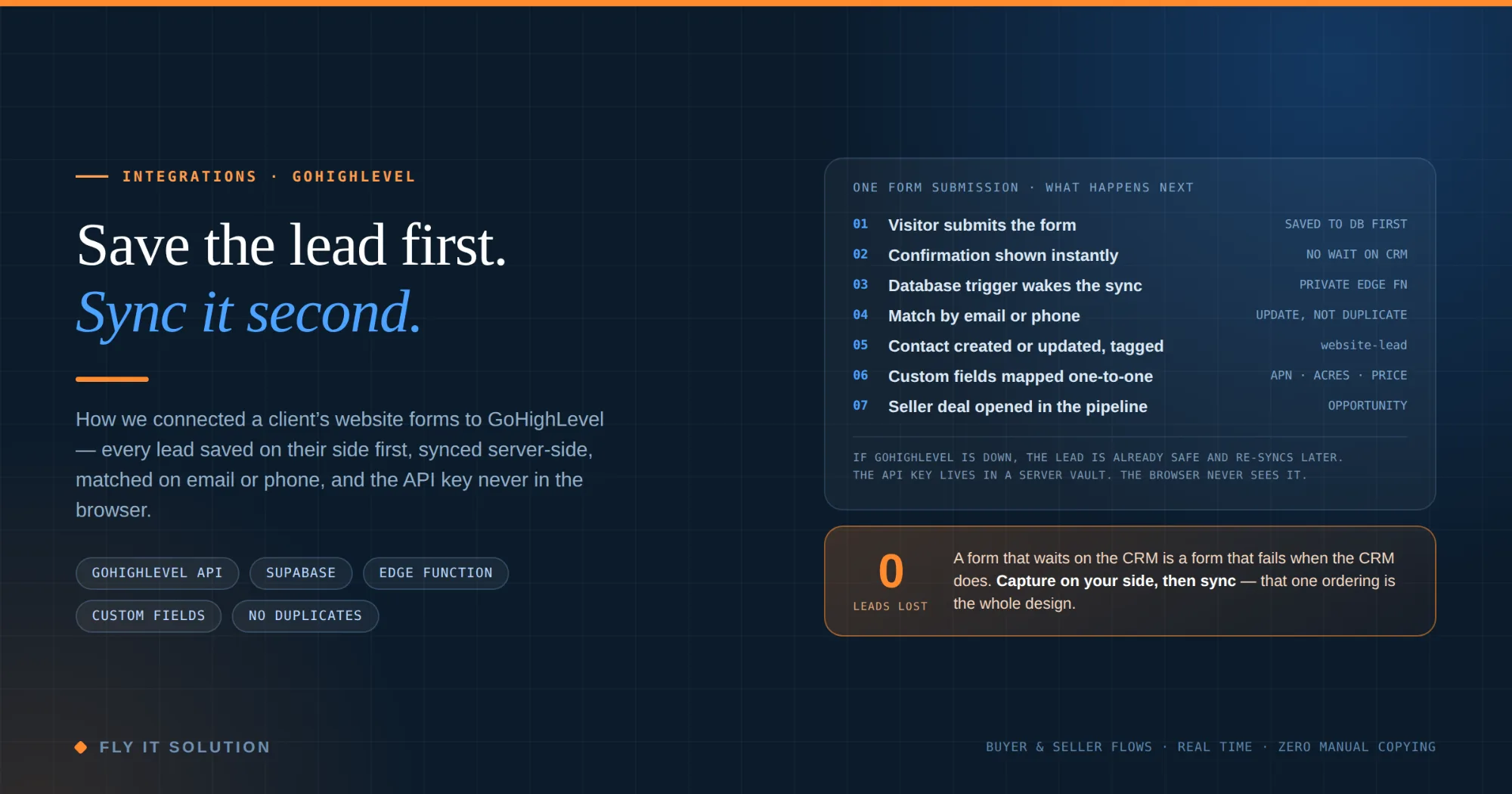
| When a visitor submits a form, the submission is saved to the website's own database first and the visitor sees confirmation immediately. A database trigger then wakes a private server-side function, which looks the person up in Go High Level by email or phone, updates them if they exist or creates them if not, tags them, maps every form answer to the right custom field, and for sellers opens an opportunity in the sales pipeline with the asking price. The Go High Level API key lives on the server and is never in the browser. If Go High Level is down, the lead is already safe and syncs later. |
|---|
Why the obvious ways lose leads
There are three ways most people connect a website form to Go High Level, and each has a failure you do not see until it costs you.
Embed Go High Level's own form. Quick, and it works — but the form is now Go High Level's, not yours. Its design, its validation, its multi-step logic and the data it collects all live in their builder, and the submission goes to their servers before it goes anywhere else. For a five-step seller form with conditional questions, that is a poor trade.
Call the Go High Level API from the browser. This puts your API key in the page's JavaScript. It does not matter how hidden or obfuscated it: anyone who opens the page source or the network tab can read it, and with it they can read and write your entire CRM. This is the one that gets people into serious trouble, and it is more common than it should be.
Call Go High Level from your server and wait for the answer. The key is now private, which is good. But the form's success screen is waiting on a third party. When Go High Level is slow, the visitor stares at a spinner; when it is down, or rate-limited, or the request times out, the visitor sees an error and the lead is gone and nobody on your side knows it ever existed.
The fix for all three is the same, and it is an ordering rather than a technology: capture the lead on your side first, then sync it.
How it works, step by step
| # | What the visitor sees | What the system does |
|---|---|---|
| 1 | Fills in a form a buyer enquiry, a 1031 exchange question, a general contact, or the five-step “sell your land” flow and submits it. | The submission is written straight to the website's own database. This is the only thing that must succeed for the lead to exist. |
| 2 | A confirmation screen, immediately. | Nothing is waiting at Go High Level. The visitor's experience is finished before the CRM is even contacted. |
| 3 | Nothing. | A database trigger on the new row wakes a private server-side sync function and hands it the lead. The function is not reachable from the browser. |
| 4 | Nothing. | The function looks like the person up in Go High Level by phone or email. If they exist, it updates their record with the new details and adds the relevant tags. If not, it creates a contact, tags it website-lead or seller-lead, and sets the lead source to “Website form”. |
| 5 | Nothing. | Every form answer is written to the matching custom field in Go High Level. For sellers, the function also opens an opportunity in the sales pipeline carrying the asking price and property details, so the deal appears on the board without anyone creating it. |
| 6 | Later, a call from the sales team. | If any step after the first fails Go High Level outage, network error, rate limit the lead is still in the database with a status showing it has not synced, and it is re-synced. Nothing is lost. |
From the visitor's side it is a form and a thank-you page. From the sales team's side, contact and a deal appear in Go High Level a moment later with everything filled in.
What gets mapped, field by field
Buyer enquiries carry the standard contact details plus the property they asked about. The seller form is where the mapping earns its keep, because a landowner enters a lot and the sales team needs all of it on the contact without opening the original submission:
| Seller form field | Where it lands in Go High Level |
|---|---|
| Name, email, phone | Standard contact fields also used for the duplicate match |
| State and county | Custom fields on the contact |
| Parcel number (APN) | Custom field on the contact |
| Acreage | Custom field on the contact |
| Asking price | Custom field on the contact and the value on the opportunity card |
| Listed with an agent? (yes / no) | Custom field on the contact |
| Ownership role (sole owner, co-owner, heir, representative…) | Custom field on the contact |
| Additional property information / notes | Custom field on the contact |
The asking price going onto the opportunity as well as the contact is a small thing that matters daily: a salesperson scanning the pipeline sees the number on the card, not after two clicks.
The three decisions that matter
Save first, sync second. Already covered, but it bears repeating because it is the whole design. The website's only job is to store the submission; everything downstream is a background task that can fail and be retried without the visitor or the lead being affected. It also means the client owns a complete record of every enquiry independently of the CRM, which is worth having on the day they change CRMs.
The key never leaves the server. The Go High Level token is stored in a server-side secrets vault and read only by the sync function. The browser talks to the database; the database triggers the function; the function talks to Go High Level. There is no path from a visitor's browser to the API key, which is the only acceptable arrangement for a credential that can read and write your entire customer list.
Match before you create. The same person enquires more than once about two parcels, or as a buyer in March and a seller in June. Looking them up by email or phone before creating anything means one contact with a full history, tagged for everything they have done, rather than a CRM full of near-duplicates a salesperson must notice and merge.
When you would do it differently
If you have no website of your own and no developer, Go High Level's embedded forms are the right answer. The trade-offs above only matter once you have a form worth owning.
If your forms are simple and your volume is tiny, a no-code connector between the form tool and Go High Level is fine until the day it silently stops, so check it weekly.
If the lead has to be in Go High Level before the visitor sees the next screen for instance to show them a calendar booked against a specific rep the save-first pattern still applies, but the confirmation waits on the sync, and you accept the slower experience for that one form.
What it costs to run
Nothing per lead. The database, the trigger and the function run on infrastructure the website already needs, and the sync is a single API call per submission. There is no middleware subscription and no per-task connector fee. The build cost is bounded: a database table, a trigger, one function, the custom fields set up in Go High Level, and the mapping which is the part that takes the most care and the least code.
FAQ
How do you connect a website form to Go High Level?
There are three common ways. Embed a Go High Level form on the site, which hands the form's design and the lead data to Go High Level. Call the Go High Level API from the browser, which exposes your API key to anyone who views the page source. Or, the way we built it: save the submission to your own database first, then have a server-side function push it to Go High Level. The third keeps the form yours, keeps the key private, and means a lead is captured even if Go High Level is unreachable at that moment.
Why save the lead to a database before sending it to CRM?
Because the CRM is a third party and third parties have outages, rate limits and slow moments. If the website waits on Go High Level to respond before confirming the form, a slow API means a slow visitor experience, and a failed call means a lost lead the business never knew about. Saving locally first means the visitor sees a confirmation instantly, the lead exists the moment it was submitted, and the sync to Go High Level can be retried if it fails. Nothing is ever lost between the form and the CRM.
How do you stop duplicate contacts in Go High Level from website forms?
Match before you create. The sync function looks the person up in Go High Level by email or phone first. If they exist, it updates their record with the new details and adds the relevant tags. Only if no match is found does it create a new contact. The same person filling in three forms over a month ends up as one contact with three interactions on it, not three contacts a salesperson must merge.
Can website form fields map to custom fields in Go High Level?
Yes, and for a serious lead form they should. Standard contact fields cover name, email and phone. Anything specific to the business - in this project, state and county, parcel number, acreage, asking price, whether the property is listed with an agent, and the owner's role - goes to custom fields created in Go High Level and mapped one-to-one from the form. The asking price is also written to the opportunity, so it shows on the deal card without anyone opening the contact.
How do you keep Go High Level API keys secure on a website?
By never putting them on the website. Any API key present in browser-side code can be read by anyone who opens the page source or the network tab, no matter how it is obfuscated. In this build the Go High Level token lives in a server-side secrets vault and is read only by a private server function that the browser cannot call directly. The website talks to the database; the database triggers the function; the function talks to Go High Level. The key never leaves the server.
Does Fly IT Solution build Go High Level integrations?
Yes. We integrate Go High Level and other CRMs with websites and custom applications - form sync, custom field mapping, opportunity and pipeline creation, tagging and lead-source attribution - with the lead saved on your side first so nothing is lost. We also build the websites and applications those leads come from. We work from Mohali, India and Minneapolis, Minnesota, with most of our Go High Level work for clients in the United States.
Closing
If leads from your website are reaching your CRM by way of a connector you do not fully trust, an embedded form you do not fully control, or an API key sitting in your page source, it is worth a look. We build these integrations and the websites and applications behind them from Minneapolis, Minnesota and Mohali, India, and we will tell you if the simple option is enough.