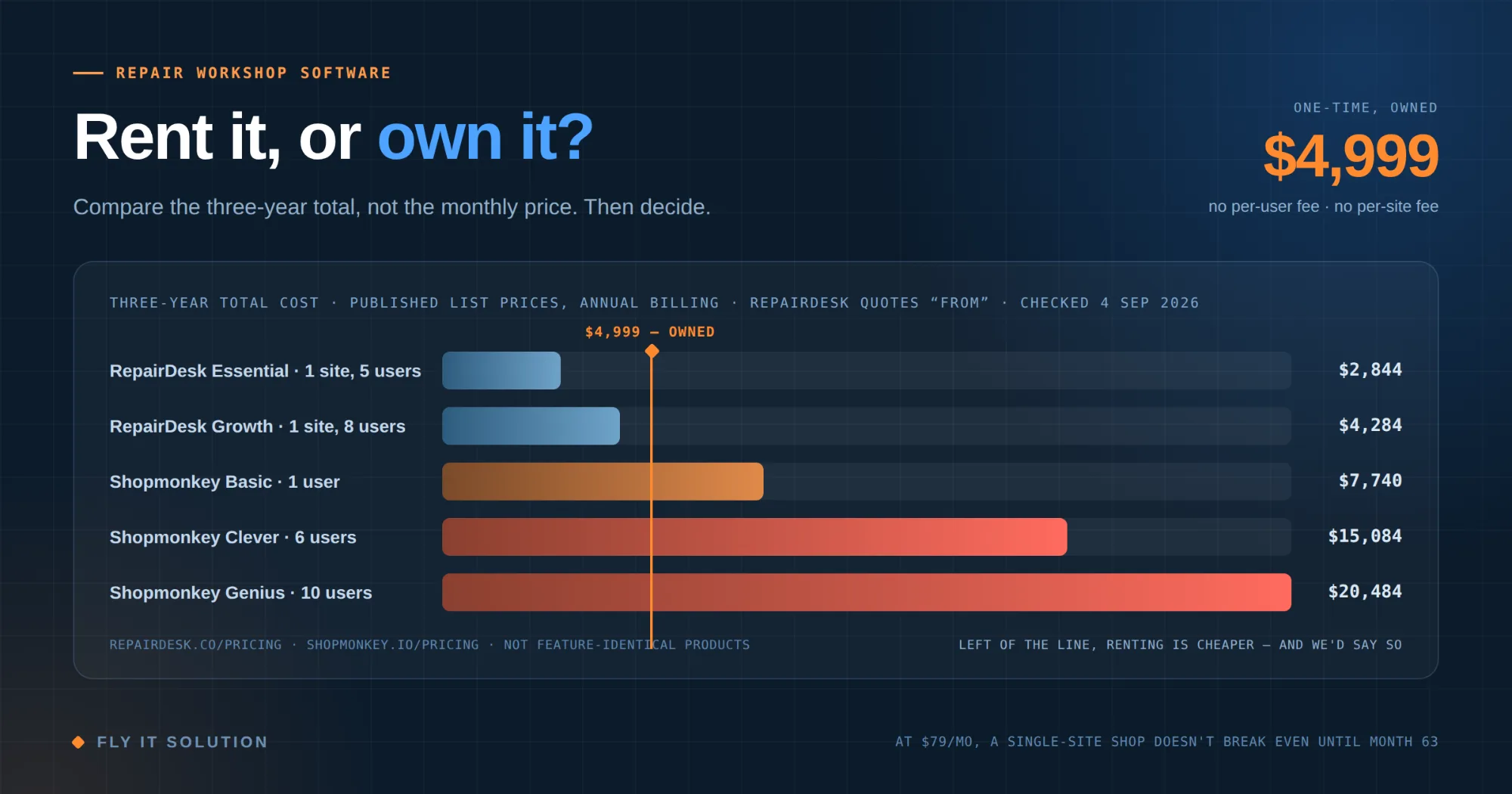
Compare the three-year total, not the monthly price. Subscription software for repair shops runs from roughly $79 to $569 a month depending on tier and headcount, which is $2,844 to $20,484 over three years and it keeps going. A one-time owned deployment costs more on day one and nothing after. The honest crossover point is somewhere between month 9 and month 63 depending on how many people and locations you have. If you are one person in one shop on an entry plan, renting is genuinely cheaper for over five years. If you have a team, more than one site, or you intend to still be trading in 2032, owning wins and it is not close.
Every repair shop owner asks the same question: how much does this software cost?
Almost everyone then compares the wrong number. The monthly price is the sticker, not the cost. What you are actually signing up for is a bill that recurs for as long as your business exists and grows every time you hire someone.
So let's do the arithmetic properly, with real published prices, including the parts that make owning look worse.
What the category charges
These are list prices published on the vendors' own pricing pages, checked 4 September 2026. Annual billing where offered, because that is the cheaper option and the fair comparison. RepairDesk publishes its figures starting from prices.
| Plan | Included | Per month |
|---|---|---|
| RepairDesk Essential | 1 store, 5 users | $79 |
| RepairDesk Growth | 1 store, 8 users | $119 |
| Shopmonkey Basic | 1 user | $215 |
| Shopmonkey Clever | 3 users | $359 |
| Shopmonkey Genius | 4 users | $449 |
Two things the table does not show. Shop monkey charges $20 per month for each additional user beyond the included count, so a five-person shop on Basic is $319 a month, not $239. And Repair Desk quotes these as starting from prices, per store rather than per account it publishes no multi-store rate, so if you have two sites you need to ask what the second one costs before you model anything.
One caveat before anyone quotes this at me: these products are not identical in scope. Repair Desk targets repair shops across many verticals, phone and computer repair most prominently, with point of sale, inventory and ticketing at the center. Shop monkey targets automotive service, with vehicle-specific parts, labour and inspection data built in. I am comparing what the category charges, not claiming feature parity. Check the specifics against your own workflow.
The three-year number
| Plan | 3 years | 5 years |
|---|---|---|
| RepairDesk Essential, 1 store | $2,844 | $4,740 |
| RepairDesk Growth, 1 store | $4,284 | $7,140 |
| Shopmonkey Basic, 1 user | $7,740 | $12,900 |
| Shopmonkey Clever, 6 users | $15,084 | $25,140 |
| Shopmonkey Genius, 10 users | $20,484 | $34,140 |
That last row is a ten-person shop paying twenty thousand dollars over three years and owning nothing at the end of it.
Break-even, stated plainly
Our platform is a $4,999 one-time deployment. Here is the month at which a subscription has cost you the same amount:
| Plan | Break-even vs $4,999 |
|---|---|
| RepairDesk Essential, 1 store, 5 users | 63 months |
| RepairDesk Growth, 1 store, 8 users | 42 months |
| Shopmonkey Basic, 1 user | 23 months |
| Shopmonkey Clever, 3 users | 14 months |
| Shopmonkey Clever, 6 users | 12 months |
| Shopmonkey Genius, 4 users | 11 months |
| Shopmonkey Genius, 10 users | 9 months |
I want to draw attention to the top row rather than the bottom one, because it is the row that makes this article worth trusting.
| If you are a single-location shop with a handful of users on an entry-level plan, renting is cheaper than buying from us until month 63. That is five years and three months. If your horizon is shorter than that, or you are not certain the business will look the same in five years, the subscription is the better financial decision, and you should take it. |
|---|
Anyone selling you software who cannot say that sentence is not doing arithmetic. They are doing sales.
What the subscription price does not include either
Fairness demands the same scrutiny in both directions, so before I pick apart my own pricing, here is what sits outside those monthly figures.
Shop monkey charges a one-time $500 data migration fee where you use their migration assistance. Card readers are $299 plus $10 per month per device, cellular connectivity is another $10 per month per device, and payment processing rates are quote-only. Repair Desk prices are published as “starting from”, and several capabilities loyalty programmers, store credit and gift cards, device buyback are listed as paid add-ons rather than included.
Both annual prices also require an annual commitment. They are a per-month equivalent, not a month-to-month rate, so the monthly and annual columns are not quite like for like.
And one point in their favour: Shopmonkey invites you to talk to them about bundling, which means real negotiated prices may land below list. Get your own quote rather than trusting my table mine is list price, and list price is where negotiation starts.
What does the one-time price not include
The $4,999 is not a lifetime-of-everything number, and I would rather you heard that here than found out later.
Hosting. The platform runs on your own server under your own domain. We include server setup and three months of maintenance, and after that the hosting bill is yours. For a shop-sized workload it is a small line item an order of magnitude below any of the subscriptions above but it is not zero, and you should price it with your provider before you compare anything.
Changes. New features, workflow changes and integrations after go-live are work, and work is billable. A subscription bundles a stream of vendor-decided improvements into the monthly fee. Owning means you decide what changes and you pay for each change specifically. Which of those is better depends entirely on whether the vendor's roadmap happens to point where you are going.
Your own operational responsibility. It is your server. Backups, updates and uptime become things somebody at your company must care about, or that you pay us to care about. A SaaS vendor absorbing that is a real service with real value.
Model those honestly, or the comparison is theatre.
What a subscription genuinely buys you
The fair case for renting, made properly:
•Someone else's problem. Uptime, backups, patching and security are handled. For an owner-operator with no technical person, that is worth real money.
•Continuous improvement without a purchase order. The product gets better while you sleep and you never approve a quote for it.
•Low commitment. On monthly billing you can leave at the end of any month. If you are not sure this software category suits your workflow at all, that optionality is worth paying for.
•No capital outlay. $99 a month is a decision you can make on a Tuesday. $4,999 is a decision that needs a conversation with whoever holds the bank card.
If those four things describe your situation, rent. Genuinely.
The two costs almost nobody models
Seat creep. The three-year table above assumes your headcount never changes. It always changes. On per-user pricing, every technician you hire raises your software bill permanently, which quietly makes growth slightly more expensive than it should be. On a one-time deployment, the eleventh technician costs the same as the first: nothing.
Switching cost. This is the one that bites. Three years into a subscription, your entire job history, customer records, quotations and invoices live in someone else's database in someone else's format. Leaving means an export you have to hope is complete, a migration, and retraining. The longer you stay, the more expensive leaving becomes which is a feature of the business model, not an accident. Ask any prospective vendor, in writing, exactly what an export contains and in what format. The quality of that answer tells you a great deal.
The part that is not about money
Two arguments for owning that do not appear in any spreadsheet.
Your brand on your documents. Job cards and invoices go to your customers. On a white-label deployment the platform runs at your domain, under your name, and those documents carry your identity rather than a software vendor's. If your customers are consumers, that matters more than most owners assume. If you are a franchise or you licence your name to others, it is not optional.
Your data is yours. Not exportable-on-request. Yours, in a database you control. Every repair you have ever done, query able, without asking permission or paying for an API tier.
How to run this for your own shop
Six steps. Do it on paper before you talk to any salesperson.
1. Count your real users. Not today's headcount the number you expect in three years. Owners, front desk, technicians, quality checkers.
2. Count your locations, now and planned.
3. Get the actual quoted price for that user count and location count. Not the headline tier price. Ask specifically about per-user overage.
4. Multiply by 36. Then by 60. Write both numbers down.
5. Add your hosting estimate to the one-time option and add a realistic allowance for changes to both.
6. Ask yourself how long you intend to run this business. That single answer decides it more than any other input.
If the honest answer to step six is "I am not sure", rent. Optionality is worth paying for when the future is genuinely unclear. If the answer is "this is my business and I will be doing it in ten years", the arithmetic stops being close.
Where our platform sits in that
For transparency, since this is our blog you should know what we are selling.
Our repair workshop platform is a $4,999 one-time white-label deployment: QR-code job tracking from intake to delivery, a mobile-first technician interface, mandatory photo capture at quality control, materials logged against each job, quotation approval before work starts, automatic branded invoicing, a real-time work-in-progress dashboard, SLA alerts, and separate roles for owners, staff, quality checkers and customers. Branding, domain deployment, configuration, team training, documentation and a post-launch support window are included, along with server setup and three months of maintenance. It is in production in a working repair shop today rather than being a demo.
No per-user fee. No per-location fee. No revenue share. If you hire five people next year, the software bill does not move.
Frequently asked questions
How much does repair shop management software cost?
Subscription products publish list prices from roughly $79 to $499 per month depending on tier, with per-user charges on top Shop monkey adds $20 per month per extra user, and Repair Desk prices per store. Over three years that is roughly $2,844 to $20,484. A one-time owned deployment such as ours is $4,999 with no recurring platform fee, plus your own hosting.
Is it cheaper to buy repair shop software outright or subscribe?
It depends on headcount, location and time horizon. Against a $4,999 one-time deployment, an entry single-store subscription at $79 a month does not break even until month 63, while a ten-user plan at $569 a month breaks even in month 9. Count your expected users in three years, multiply the quoted monthly by 36 and 60, and compare.
What is the catch with one-time repair shop software?
Three things, and they are real. You pay for your own hosting after the included maintenance period. Changes and new features after go-live are billable rather than bundled. And server responsibility backups, updates, uptime becomes yours or something you pay someone to handle. Price all three before comparing.
Does a repair shop subscription get more expensive as I grow?
Usually yes. Most products charge per user, per location, or both, so every technician you hire and every branch you open raises the recurring bill permanently. A one-time deployment does not change price with headcount.
Can I run repair shop software under my own brand?
With a white-label deployment, yes. The platform runs on your domain under your name, and job cards and invoices carry your branding rather than a software vendor's. That matters because those documents go to your customers. Most subscription products do not offer it at all.
What happens to my data if I leave a repair shop software subscription?
That depends entirely on the vendor's export. Ask before you sign, in writing, exactly what an export contains and in what format full job history with photos, or a CSV of customers. Switching cost rises the longer you stay, so the answer to that question is worth more than a discount on year one.
The bottom line
There is no universal answer here, and anyone giving you one is selling rather than advising.
Renting is right for a small single-site shop, for anyone unsure this category fits their workflow, and for anyone who cannot or should not spend capital right now. Owning is right for teams, for multiple sites, for anyone whose brand goes on the paperwork, and for anyone confident they will still be doing this in five years.
The mistake is not wrong. The mistake is comparing a monthly number to a one-time number and calling that a comparison.
Request a free demo →Bring your user count and your location count. We will run the three-year and five-year numbers with you against whatever you are currently quoted and if renting comes out ahead for your shop, we will tell you that.
Fly IT Solution builds white-label business platforms and custom software from Mohali, India and Minneapolis, Minnesota, with more than a decade of delivery across repair and field services, healthcare, EdTech, e-commerce and logistics. Our repair workshop platform is available as a one-time branded deployment on your own domain, and is running in a live repair business today.
Competitor prices above are list prices published by those vendors and were checked on 4 September 2026; they change, and your quoted price may differ. The products compared are not feature-identical verify scope against your own workflow. The comparison of ownership models is our opinion as a vendor of one of them, and you should weigh it accordingly. This is general commercial guidance, not financial advice.
Sources: RepairDesk published pricing, repairdesk.co/pricing; Shopmonkey published pricing, shopmonkey.io/pricing.