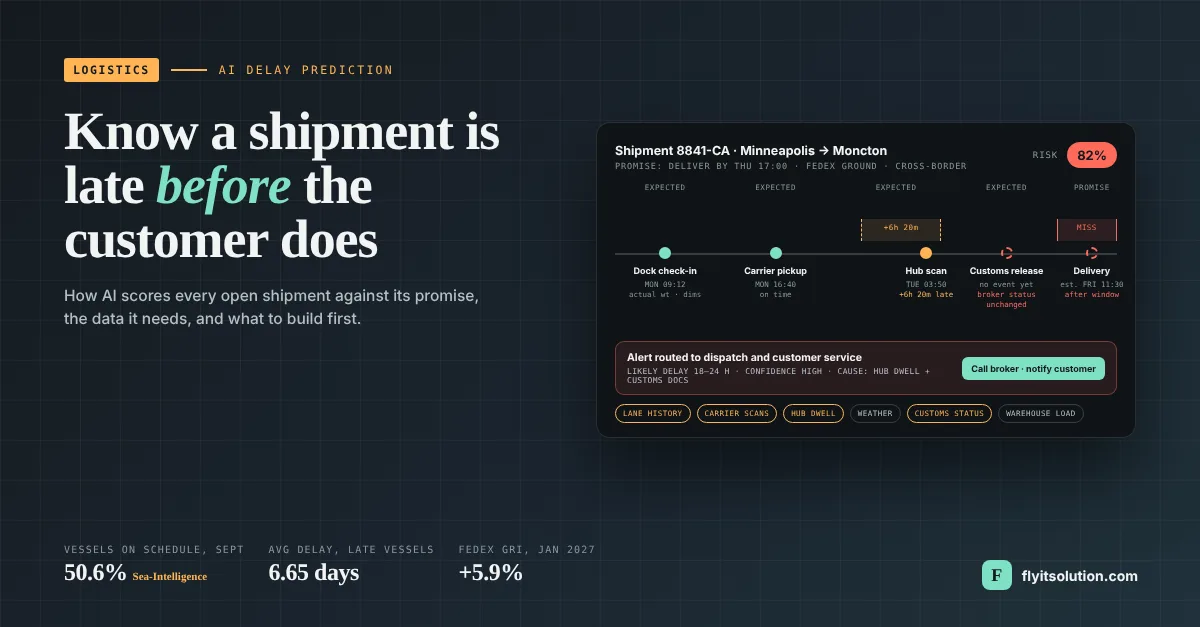
Logistics companies use AI to predict delivery delays by scoring every open shipment against its promised window, using the shipment's own events so far, the history of the same lane and carrier, and outside signals such as weather and port congestion. The output is a risk score and a likely delay, hours or days before the miss, which is the difference between a dispatcher fixing a problem and a customer reporting one.
The need is not abstract this week. Only 50.6 percent of container vessels arrived on schedule in September 2026, up 0.9 points on August, and late ships averaged 6.65 days behind, according to Sea-Intelligence's September 2026 Global Liner Performance figures (external, FreshPlaza) published on 29 October. On the parcel side, FedEx's average 5.9 percent rate increase takes effect on 4 January 2027, per Supply Chain Dive's report on FedEx's 2027 rates, so every late shipment will also cost more to re-ship.
This post explains the difference between tracking and prediction, what AI can and cannot predict, the data it needs, how a prediction is produced in five steps, what a production system requires, the two foundations we have already built for logistics clients, and a six-step plan for building prediction into an existing operation.
Tracking tells you where a shipment is; prediction tells you it will be late
Tracking is a location and a status. It answers where the shipment is now and what last happened to it, and most logistics companies already have it from their carriers.
An ETA is a single estimated time. It moves as the shipment moves, and it says nothing about how likely the shipment is to miss the window the customer was promised.
Delay predictions compare progress against the promise. It produces a probability that the shipment misses its window, an estimate of how late it is, and, when the model is good, the leg or stop where the delay is forming, early enough for someone to act.
What AI can predict in logistics
Three predictions are realistic with ordinary logistics data, and a fourth is harder than vendors admit.
Will this shipment miss its window? A risk score per open shipment, updated as events arrive. This is the most useful prediction and the easiest to act on.
How late will it be? A delay duration, usually as a range, so customer service can tell a customer tomorrow rather than later.
Where is the delay forming? Pickup, warehouse, carrier handoff, line-haul, customs or last mile, so the right team gets the alert.
What will one delay do to the rest of the route? Cascading impact on later stops or connecting legs; useful, but it needs route and capacity data most companies do not record cleanly yet.
The data delay prediction needs
The model is only as good as the event history, and the event history is where most projects stall. The minimum is every shipment event with a timestamp, the promise for each shipment, and months of outcomes.
| Data | What it provides |
|---|---|
| Shipment events | Booking, pickup, warehouse check-in and check-out, carrier scans, out for delivery, delivered, exception; each with a timestamp and a source. |
| The promise | Delivery window, SLA, appointment time or carrier-committed date, attached to the shipment record. |
| Outcomes | Whether each past shipment was late, by how much, and why if known; this is what the model learns from. |
| Carrier and lane history | On-time performance by carrier, service level, origin, destination and day of week. |
| Warehouse state | Order volume, staffing, cut-off times and dock load on the day a shipment is handled. |
| Outside signals | Weather, port and hub dwell, road closures, customs status for cross-border freight. |
| System events | TMS, WMS and ERP records, and EDI 204 load tenders and 214 status messages where carriers use them. |
A company that already has a consolidated shipment record with carrier scans and warehouse events can move to prediction in months. A company whose events live in five carrier portals, and a spreadsheet has a data project first, and that is normal.
How a delay prediction is produced: five steps
Every production system does the same five things, whether it is a rule set or a trained model.
1. Establish the expected path. From the lane, carrier and service level, set the expected time for each event: pickup by 10:00, hub scan by 18:00, delivery within the promised window.
2. Monitor actual events. Each incoming scan, check-in or status message is matched to the shipment and compared with the expected time for that event.
3. Detect deviation. A pickup that is 40 minutes late or a hub scan that has not arrived is a deviation; the system records its size and which leg produced it.
4. Estimate the impact. From history, estimate what a deviation of that size on that leg usually does to the final delivery, including recovery when later legs have slack.
5. Assign risk and confidence. Output a probability of missing the window, a likely delay, and a confidence level, then route the alert if the risk crosses the threshold the operations team set.
The delays AI can detect by stage
| Stage | Signal the model watches |
|---|---|
| Before the vehicle moves | Order released late, warehouse cut-off missed, pickup not confirmed by the usual time for that lane. |
| Carrier handoff | Label created but no acceptance scan within the carrier's normal window; a known weak point for multi-carrier shippers. |
| Line-haul and hub | Scan gaps longer than the lane's median, hub dwells above normal, weather on the route. |
| Cross-border | Customs documents are incomplete at departure, broker status unchanged, duty or de minimis thresholds crossed. |
| Last mile | Out-for-delivery scan later than usual for that depot, or driver stop count above the depot's normal capacity. |
What we have built for logistics clients, and what comes next
We have built the two foundations that delay prediction stands on: one shipment record with live carrier data, and a model layer that forecasts and flags anomalies. We have not yet shipped a delay-prediction model for a client, and this section says what exists rather than what could.
The first foundation is a multi-carrier shipping platform for a shipping and package-forwarding operator serving US and Canadian customers, built on Laravel and MySQL on AWS. FedEx, USPS and Canada Post are connected through their APIs for live rating, booking and tracking across one Canadian and two US warehouses.
Four of its design decisions are exactly what prediction needs. Warehouse check-in records actual weight and dimensions against the expected shipment, so every parcel has a timestamped event at the dock; a firm delivery estimate is issued on arrival for customer approval, which puts the promise on the record; tracking from all three carriers is unified in one view; and carrier calls are queued and run in parallel so one slow carrier never blocks the page, with quotes showing which carrier failed to respond rather than hiding it. The case study has the full eight-step shipment flow.
The second foundation is an operations platform with a forecasting and anomaly layer built for a specialty distributor on React, Node.js and PostgreSQL, where Python models forecast demand, suggest reorders and flag unusual stock movements and unbilled items each morning. The same pattern, a model scoring records and pushing a prioritized list into the team's daily view, is how delay prediction is delivered.
Putting the two together is the next layer: shipment events from the shipping platform feeding a model that scores each open shipment and routes alerts to dispatch and customer service. For brokers and multichannel sellers, the shipping side is covered in shipping software for Canadian brokers and multichannel sellers; for distributors whose delays start in the warehouse, see custom ERP distribution software.
What a production system needs beyond the model
A model in a notebook predicts nothing in operations. Five things turn it into a system.
Integration, not replacement. The prediction layer reads from the TMS, WMS, ERP and carrier APIs and writes alerts back into them; our custom ERP software development service includes integration with logistics, e-commerce, accounting and third-party APIs for exactly this reason.
Alerts in the workflow. Flagged shipments appear in the dispatcher's queue or the customer service inbox with the reason and a suggested action, not on a dashboard nobody opens.
Thresholds the team owns. Operations decide what risk level triggers an alert, per customer or lane, and can change without a developer.
Monitoring and retraining. Lanes, carriers and seasons change; the model's hit rate is tracked, and it is retrained on a schedule, with cold-start rules for new lanes.
Human oversight. Every alert record what the team did and whether the shipment was still late, and no action is taken automatically that a dispatcher would not take.
How to tell whether it is working
Four numbers decide it, and none of them is model accuracy on a test set: lead time (how many hours before the miss the alert was raised), precision (what share of alerts were real), intervention rate (what share of alerts the team acted on), and outcome (the on-time percentage for flagged shipments the team touched, against those it did not).
A system that raises fewer alerts with more lead time and a higher intervention rate is improving, even if a benchmark score is flat. Report those four numbers monthly from the first week of the pilot.
Custom or off-the-shelf?
Use a carrier's or a visibility vendor's built-in prediction when your freight runs on one or two carriers, your promise is the carrier's committed date, and you do not need the alert inside your own systems. Build custom when shipments cross several carriers and warehouses, when the promise is your customer's window rather than the carrier's date, when alerts must land in your TMS or your own portal, or when the data itself is an asset, you want to own.
A custom build should start small, as MVP software development: one lane or one customer, rules before models, alerts in one queue. Companies that want to offer predictions to their own shipper customers are building a product, which is a SaaS software development project with tenancy and billing from the start.
A six-step plan for building delay prediction into an existing operation
The order matters more than the algorithm, and the first two steps need no data scientist.
1. Put every shipment event in one place first. Pull carrier tracking, warehouse check-in and check-out, pickup confirmations and delivery scans into one shipment record with timestamps. A model cannot learn from events that live in five portals, and most logistics companies discover at this step that half their events are never recorded.
2. Define what late means for each shipment. Attach the promise to the record: the customer's delivery window, the SLA or the carrier's committed date. Delay prediction is a comparison against a promise, and without the promise on the record there is nothing to predict against.
3. Start with rules on deviation, not with a model. Flag any shipment whose latest event is later than the median for that lane and leg and route the flag to a person. This produces the labeled history a model needs, and it catches the worst cases on day one.
4. Train on your own lanes and measure lead time. Once three to six months of events and outcomes exist, train a model to score each open shipment's risk of missing its promise, and measure how many hours before the misspell raised the flag. Lead time is the number that decides whether anyone can act.
5. Put the alert where the work happens. A risk score in a dashboard nobody opens changes nothing. Push flagged shipments into the dispatcher's queue, the customer service inbox or the TMS task list, with the reason and the suggested action attached.
6. Close the loop and retrain. Record what the team did with each alert and whether the shipment was still late. That feedback is what separates a model that improves each quarter from one that is quietly switched off.
Working with Fly IT Solution on logistics software
Projects start within 48 hours of agreement, with weekly progress reports, fixed-price or hourly billing, a written quote within 24 hours of a free consultation, and full ownership of the code. Our engineering teams in Minneapolis and Mohali build and support the platform, with consultants in Westerville, Ohio and Moncton, and New Brunswick.
Logistics companies with their own engineers can hire dedicated developers in Laravel, Node.js, React or Python to add the prediction layer to what they have. Either way, the first conversation is about your shipment record: book a free consultation and bring one late shipment's full event history, in whatever form it exists.
Frequently asked questions
What is AI delivery prediction?
AI delivery delay prediction is software that scores each open shipment's risk of missing its promised delivery window before the missing happens, using the shipment's own events so far, the history of the same lane and carrier, and outside signals such as weather and port or hub congestion. It differs from tracking, which shows where a shipment is now, and from an ETA, which is a single estimated time with no risk attached.
What data does an AI model need to predict delivery delays?
At minimum: every shipment event with a timestamp (booking, pickup, warehouse check-in and check-out, carrier scans, delivery), the promised window or SLA for each shipment, and at least a few months of history showing which shipments were late and by how much. Useful additions are carrier performance by lane, warehouse load, weather, port and hub dwell times, and customs status for cross-border freight.
How accurate is AI at predicting delivery delays?
Accuracy depends on the quality and completeness of the event history more than on the algorithm, so no honest vendor quotes a figure before seeing the data. The measures that matter are how many hours of warning the model gives before a miss, how many of its alerts turn out to be real, and how many late deliveries the team prevented after acting on them. A model should be judged on those after a pilot on live shipments, not on a benchmark.
What is the difference between ETA prediction and delay prediction?
An ETA is one estimated arrival time, recalculated as the shipment moves. Delay prediction compares the shipment's progress against its promise and outputs a risk score and a likely delay duration, early enough for a dispatcher or customer service team to intervene. A shipment can have a confident ETA and still be flagged, because the ETA is after the promised window.
Can delay prediction be added to an existing TMS or shipping platform?
Yes, and it usually should be. The prediction layer reads events from the TMS, WMS, carrier APIs and warehouse systems, scores shipments, and writes alerts back into the tools the team already uses. Replacing the TMS is not required; what is required is that every event the model needs reaches one shipment record, which is often the real project.
Has Fly IT Solution built logistics software with carrier integrations and AI?
Yes, we built a multi-carrier shipping platform on Laravel with FedEx, USPS and Canada Post connected through their APIs for live rating, booking and tracking across one Canadian and two US warehouses, including warehouse check-in of actual weight and dimensions and unified tracking from all three carriers. Separately, we built an operations platform with a Python model layer that forecasts demand and flags anomalies. Delay prediction is built on the same two foundations: one shipment record and a model layer over it.
How long does it take to build delay prediction for a logistics company?
The data consolidation and the rule-based first release usually take a few months, and the trained model follows once three to six months of labeled history exist. Projects start within 48 hours of agreement with weekly progress reports, fixed-price or hourly billing and a written quote within 24 hours of a free consultation, and the client owns the code.