Custom real estate transaction management software is a system built for one brokerage, team or title company that tracks every deal from signed agreement to funded closing, with the checklists, documents, deadlines, approvals, client portal and integrations arranged around how that business actually works. It makes sense when a subscription product can no longer follow your transactions, and it is the wrong choice for a small team with standard residential deals.
This post is for the people who have hit that limit. It covers when to build instead of buy, the eight modules a transaction system needs, the integrations that decide whether staff use it, the compliance rules it must enforce, what it costs, and a six-step way to scope one.
Why transaction management is where subscriptions break first
Transaction management breaks subscriptions before any other real estate tool because it is the one place where every other system meets: the CRM that produced the client, the MLS that produced the listing, the e-signature tool that produced the contract, the title company, the lender and the accounting system. A product built for the average brokerage handles the average deal and leaves the exceptions to email.
The exceptions are the business. Land sales with multiple parcels, commercial leases with options, referral deals, a brokerage that also runs title or property management: each one needs fields, documents and approvals the vendor did not build, and the workaround is a spreadsheet beside the software.
E-signature is already universal; NAR's 2025 Technology Survey found 79% of REALTORS use it. The problem is not signing the documents, it is knowing which document is missing, who is holding the deal, and whether the wire instructions that arrived this morning are real.
Build or buy: five conditions
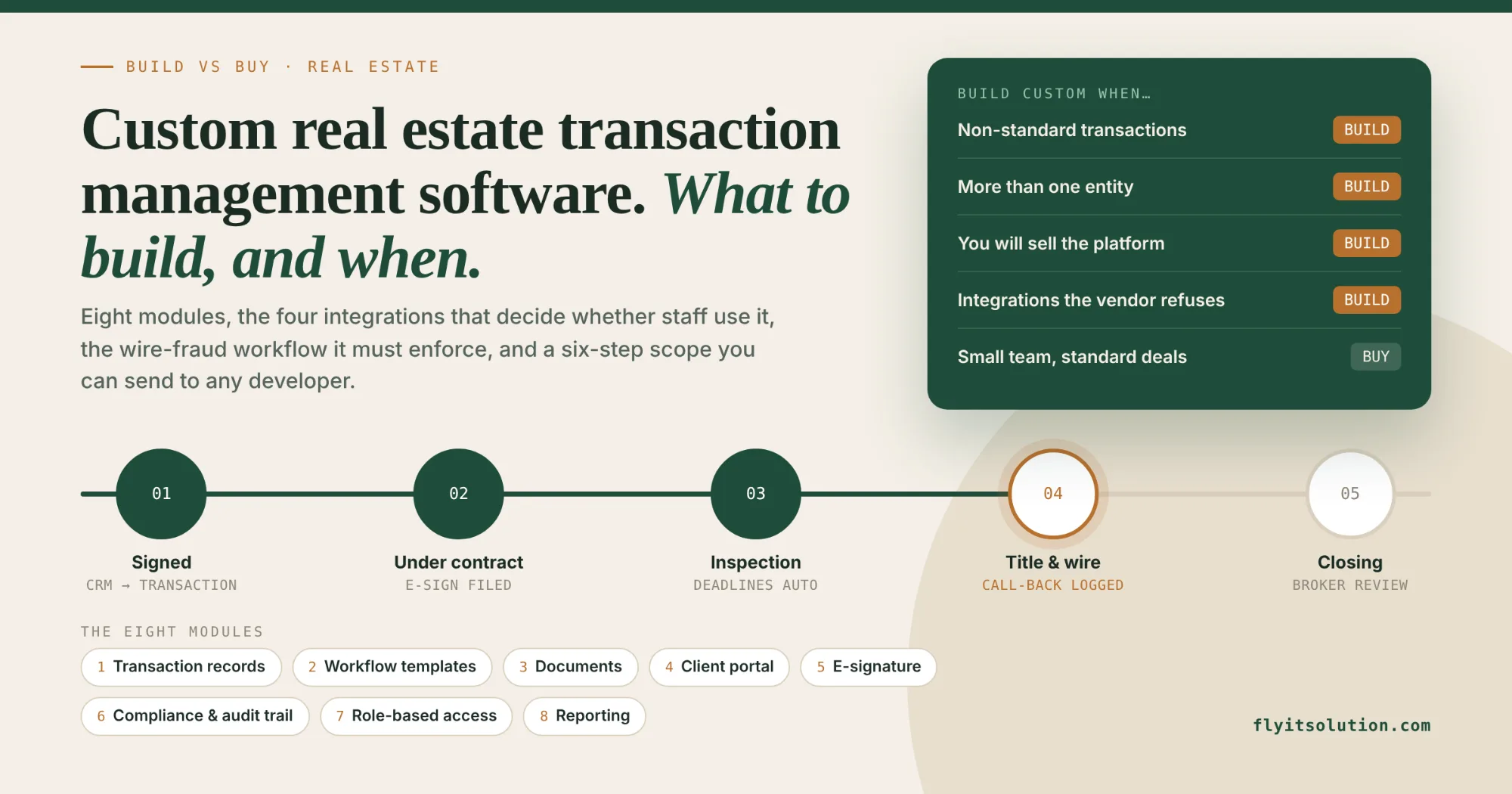
Build custom transaction management software when at least one of these five conditions holds; if none does, buy a subscription and spend the money on marketing.
| Condition | Why a subscription struggles |
|---|---|
| Non-standard transactions | Land, commercial, auctions and bulk portfolios need parcel data, option periods and grouped assets that residential templates do not model. |
| More than one entity | A brokerage with a title, lending or property management arm needs one record that crosses entities without re-keying. |
| You will sell it | If other brokerages would pay for your process, you need a multi-tenant platform you own, not a seat license. |
| Integrations the vendor refuses | Your accounting package, a regional MLS, a custom CRM or an internal approval system that the vendor's roadmap will never reach. |
| You want the data | Years of transaction history, timelines and documents in your own database, exportable and queryable, rather than in a vendor's export tool. |
The honest counter-case: a single agent or a team of five doing standard residential deals will get a better product for less money from a subscription, and a custom build would be an expensive way to avoid learning one. The real estate software development page describes where we draw that line for each project type.
The eight modules to build
A transaction management system needs eight modules, and the first four are enough for a first release.
- Transaction records
One record per deal with type, status, parties, property, key dates and money, visible to everyone with a role on it. The record is the spine everything else hangs on.
- Workflow templates and deadline tracking
A checklist per transaction type that creates tasks and deadlines automatically from the contract date, with reminders to the person responsible and escalation to the broker when a deadline slips.
- Document management
Required documents per transaction type, upload from email or the portal, versioning, and a clear view of what is missing. Retention rules apply automatically after closing.
- Client portal
Buyers and sellers see their own deal's status, next steps and documents, and sign or upload from the portal. On our land listing and lead platform, the same role-based portal pattern gives clients their own records while staff see everything; permissions are enforced on the server, not hidden in the screen.
- E-signature integration
Envelopes created from the transaction record with the parties pre-filled, status pulled back automatically, and the signed document filed without anyone downloading it. Build on the provider you already pay for rather than replacing it.
- Compliance review and audit trail
Broker review before a file is marked complete, required-document checks that block closing status, and an immutable log of who changed what and when. This module is what makes the system defensible in a complaint or an audit.
- Role-based access
Agents, transaction coordinators, brokers, clients, title and lenders each see what their role needs and nothing else. Outside parties get time-limited access to one transaction.
- Reporting
Pipeline by stage, deals closing this month, deadlines at risk, commission forecasts and coordinator workload, from live data rather than a Friday spreadsheet.
The integrations that decide whether it gets used
Staff use a transaction system when it removes re-keying, and abandon it when it adds any. Four integrations decide that: the CRM, so a won lead becomes a transaction with one click; the MLS, so listing data arrives instead of being typed; e-signature, as above; and accounting, so commissions and fees post without a second entry.
Our rule for all of them is the one we use for website forms to GoHighLevel: save to your own database first, then sync, so a vendor outage never loses a record. Where no CRM fits, custom CRM software development puts leads and transactions in one system.
Compliance and wire fraud: rules the software must enforce
Transaction software must enforce the rules people forget under pressure: required documents by transaction type, broker review before closing status, retention periods, an audit trail on every change, and verification of wire instructions before any funds move. The FBI's Internet Crime Complaint Center recorded 12,368 real estate fraud complaints and more than $275 million in losses in 2025, as reported by NAR, and most of it starts with a changed wire instruction in an email.
The software answer is a workflow, not a warning banner: wire instructions are entered once, by a verified party, in the portal; any change requires a call-back to a known number, logged in the system; and the closing checklist cannot complete until that log entry exists. State rules on advertising and record-keeping differ, so the templates are built per state and your broker or counsel confirms them.
What custom transaction management software costs
Most custom real estate projects we take on fall between $5,000 and $25,000, and a first release of a transaction management system, with records, checklists, documents and a client portal, fits inside that range and takes four to six weeks. Larger platforms with MLS feeds, accounting sync, several entities and a mobile app cost more and typically take four to six months.
A subscription costs less in month one and more every year you grow, with the data in someone else's database at the end. A custom build costs more in month one, then costs hosting and maintenance, and the asset is yours; if you intend to sell the platform to other brokerages, our SaaS software development service covers multi-tenancy and billing from the start.
How to scope it in six steps
Six steps turn your deal process into a specification any developer can quote, and they take a week of a coordinator's part-time attention, not a month.
1. Write down one transaction from signed listing to funded closing. List every document, deadline, approval and hand-off in order, with who does each. This becomes the workflow template and exposes the steps that live in someone's head.
2. Decide the transaction types and who touches each. Residential sale, purchase, lease, land, commercial and referral have different documents and deadlines. Name the roles for each: agent, transaction coordinator, broker, client, title, lender.
3. Pick the systems of record you will keep. E-signature, CRM, MLS, accounting and email already hold data. Decide which stays the source of truth for each field so the new system syncs instead of duplicating.
4. Set the compliance rules the software must enforce. Required documents per transaction type, broker review before closing, retention periods, an audit trail on every change, and wire-instruction verification before any funds move.
5. Define the first release and leave the rest for later. A first release is usually transaction records, checklists with deadlines, document storage and the client portal. Reporting, accounting sync and AI features come once the team uses it daily.
6. Ask for a written quote with ownership terms. The quote should name the scope, the fixed price or sprint rate, the timeline, and confirm that the code, data and hosting are in your name from day one.
Our MVP software development page explains how we turn step five into a working release in four to six weeks.
Free scope review
Write out one transaction as in step one and send it to us. Within 24 hours you get a free scope review: the modules it needs, the integrations involved, a first-release outline and an honest note if a subscription would serve you better. Request a free scope review; an NDA is available on request.
If you go ahead, the written quote follows within 24 hours of the consultation, the project can kick off within 48 hours of agreement, you see a demo every week, and the code, data and hosting are in your name from day one. We build from our Ohio office for clients across the United States, and teams with their own developers can hire dedicated developers for the integration work alone.
Frequently asked questions
What is custom real estate transaction management software?
Custom real estate transaction management software is a system built for one brokerage, team or title company that tracks each deal from signed agreement to closing, with the workflow templates, documents, deadlines, approvals, client portal and integrations arranged around how that business actually works. Unlike a subscription product, the company owns the code and data and decides what it connects to.
When should a brokerage build custom transaction management software instead of buying it?
Build when at least one of five conditions holds: you run non-standard transactions such as land, commercial or auctions; you operate more than one entity, such as a brokerage with a title or property management arm; you want to sell the platform to other brokerages; you need integrations a vendor will not build; or you want to own your transaction data outright. A single agent or small team with standard residential deals is usually better served by a subscription product.
What features should a real estate transaction management system include?
Eight modules: transaction records with status, workflow templates with deadline tracking, document management with versioning, e-signature integration, compliance review and an audit trail, a client portal, role-based access for agents, coordinators, brokers and outside parties, and reporting. CRM, MLS and accounting integrations connect it to the systems you already run.
How much does custom real estate transaction management software cost?
Most custom real estate projects we take on fall between $5,000 and $25,000, and a first release of a transaction management system, with records, checklists, documents and a client portal, fits that range. Larger platforms with MLS feeds, accounting sync, several entities and a mobile app cost more and take four to six months. You get a fixed written quote after a free consultation.
How long does it take to build?
A first working release typically takes four to six weeks, with the team using it on live transactions from then on. Larger systems typically take four to six months, delivered in sprints with a demo every week. Projects can kick off within 48 hours of agreement.
Can Fly IT Solution build transaction management software for my brokerage?
Yes. We build custom real estate software, including a live land listing and lead platform with role-based access, document handling and CRM sync, from our Westerville, Ohio office for clients across the United States. Send a description of one transaction and we reply within 24 hours with a free scope review and written next steps; an NDA is available on request.