Every WordPress site on versions 4.7 through 7.1.3 should be updated to 7.1.4 or its branch's patched release now, with web access to the wp-content/upgrade folder blocked during the update. CVE-2026-119977, a weakness in the upgrade process, is being exploited, and the update that fixes it leaves the window open one last time.
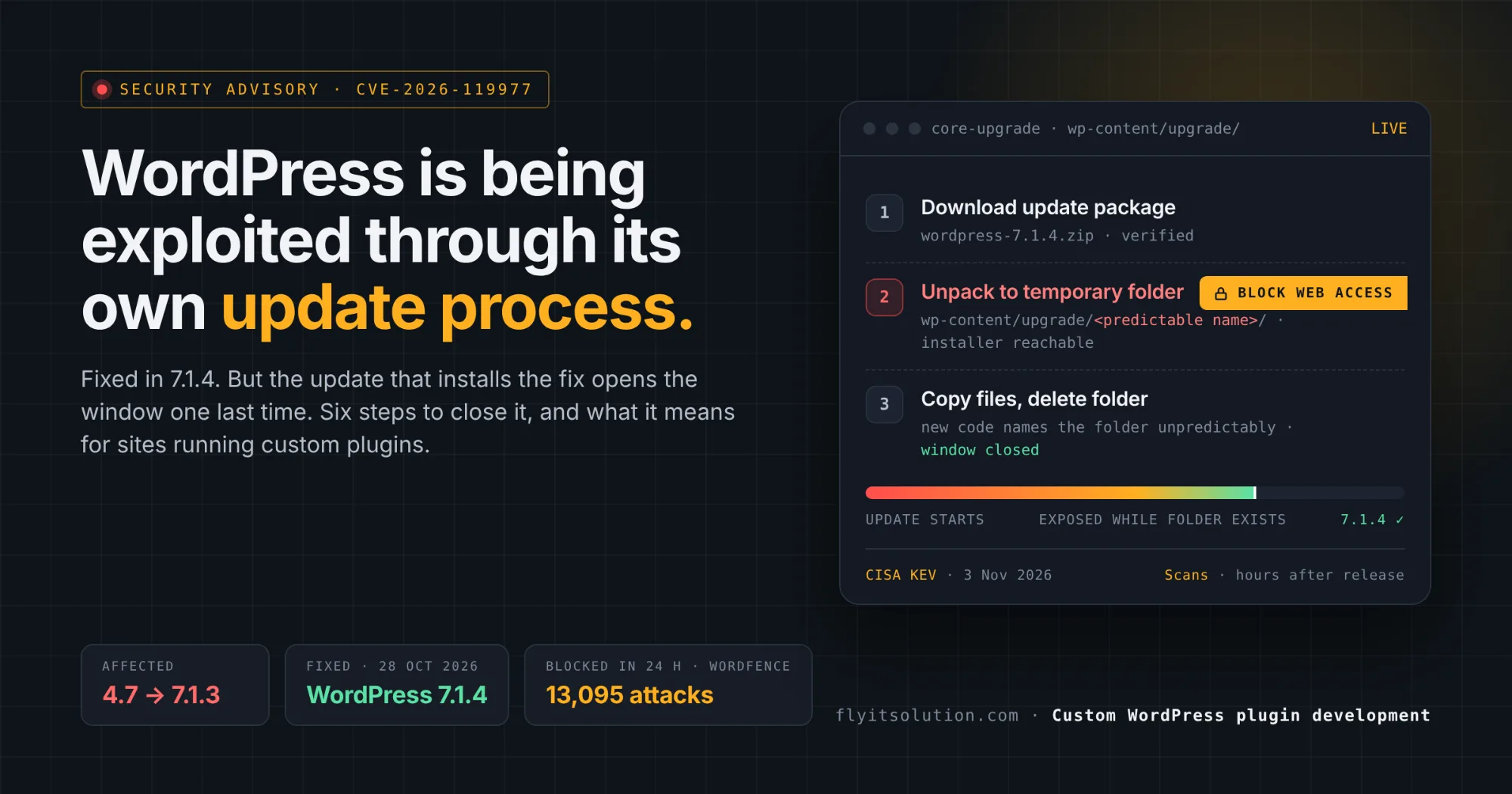
WordPress 7.1.4 shipped on 28 October 2026 as a security release, with the issue described as remote code execution during the upgrade window and credited to Umut Bayram of Picus Security, per the WordPress 7.1.4 release post. CISA added the flaw to its catalog of exploited vulnerabilities on 3 November, and Wordfence reported blocking 13,095 attack attempts in 24 hours, per Panorays' summary.
This post explains the flaw in plain terms, why the fix needs one extra step, what it means for a business site that depends on custom plugins, and a six-step safe update.
What the flaw is
When WordPress updates itself, it unpacks the new files into a temporary folder under wp-content/upgrade and deletes the folder when it is done. On sites running 5.9 or later, that folder's name can be predicted.
An attacker who guesses the name and reaches the installer inside it before WordPress deletes it can run code on the server, with no account needed, per The Hacker News report. The window is short, which is why WordPress rates the issue low while Wordfence scores it 8.1 out of 10.
Short windows are enough for automated attackers. Wordfence saw attempts begin nine minutes after it deployed a firewall rule on release day, and observed scanners checking sites for hours, consistent with trying to catch an update in progress.
Why installing the fix needs one extra step
The update that installs 7.1.4 is run by the old update code, so the predictable folder exists once more during that one update. After it, the new code names the folder unpredictably and the window is closed.
The researcher's advice is to block web access to wp-content/upgrade before clicking Update, at the web server or the firewall. Complete update packages always include the installer; partial packages expose a site only if they contain it, so treat every update as if it does.
What this means for sites running custom plugins
The flaw is in WordPress core, not in any plugin, so a custom plugin does not cause it. Plugins decide something else: whether the site gets updated at all.
The most common reason a business site is still on 7.1.3 three weeks after a security release is a plugin that nobody dares to break. A custom plugin written years ago for a workflow the business still runs, with no developer on call, turns every core update into a risk assessment that ends in delay.
The second reason is a plugin nobody maintains. When that plugin's own vulnerability is found, there is no fix to install, and the only options are to remove the feature or rebuild it. The signs you need a custom WordPress plugin post covers when a bespoke plugin is the right call; the condition is that it has a maintainer.
Our custom WordPress plugin development service exists for both cases: plugins built to be compatible with each core release, and existing plugins taken over, tested against 7.1.4 and fixed the same day a core update lands.
A six-step safe update
The order matters, and step three is the one most guides leave out.
1. Check your version and your plugins' compatibility. Note the WordPress version in Dashboard, Updates. List every plugin, especially custom ones, and confirm each is tested with 7.1.4 or has a maintainer who can fix it the same day.
2. Take a full backup you have actually restored once. Files and database, stored off the server. A backup that has never been restored is a hope, not a backup.
3. Block web access to the upgrade folder before you click Update. Deny requests to wp-content/upgrade at the web server or firewall, as the researcher who found the flaw recommends. This closes the window that the update process itself leaves open on sites running 5.9 or later.
4. Run the update on staging first if you have custom plugins. Update a copy of the site, run through checkout, forms, logins and any custom plugin screens, then update production.
5. Update production and verify the version. Dashboard, Updates, Update Now, then confirm 7.1.4 (or the patched release for your branch) is shown and that the upgrade folder is empty.
6. Check for signs of compromise. Review users added since 28 October, files changed in wp-content outside your deployments, scheduled tasks you do not recognize, and the firewall log. If anything is wrong, restore from backup and rotate every password and key.
If your site cannot be updated
A site that cannot be updated because a plugin or theme breaks on 7.1.4 is a site with a deadline, not a site with an excuse. The fix is to repair or replace the blocking plugin, which is usually days of work, not weeks.
A site on 4.6 or earlier, or on a PHP version that is itself out of support, is past repair and should be rebuilt; the same situation on custom PHP applications is covered in our PHP2Shell post and our legacy code migration service. Businesses weighing whether WordPress is still the right platform for a new site will find the comparison in Lovable vs WordPress.
Free security check
Send us your site address and we will confirm your WordPress version, review your plugins for compatibility with 7.1.4 and for abandonment, and tell you what is exposed, within one business day and at no charge. Request a free security check.
If work is needed, the quote is written within 24 hours and the project starts within 48 hours of agreement: a staged update with the upgrade folder protected, custom plugin fixes, a compromise review and, if you want it, ongoing maintenance so the next release is routine. Teams with their own developers can hire dedicated developers for the plugin work alone.
Frequently asked questions
What is CVE-2026-119977?
A weakness in the WordPress upgrade process, reported by Umut Bayram of Picus Security and fixed in WordPress 7.1.4 on 28 October 2026. During an update, files are unpacked into a temporary folder whose name can be predicted on sites running 5.9 or later; an attacker who reaches the installer in that folder before WordPress deletes it can run code on the server. WordPress rates the issue low; Wordfence scores it 8.1, and it has been added to CISA's list of exploited vulnerabilities.
Which WordPress versions are affected and which are fixed?
Versions 4.7 through 7.1.3 are affected, as reported by Panorays and The Hacker News. The fix is in 7.1.4, with patched releases for older supported branches down to 4.7.39. Sites on 4.6 or earlier no longer receive security fixes and should be rebuilt.
Why can installing the fix expose a site one last time?
Because the update that installs the fix still runs the old update code to unpack the new files, so the predictable temporary folder exists once more during that one update. Blocking web access to wp-content/upgrade before updating closes the window; after the update, the new code uses an unpredictable name.
Does this flaw affect custom plugins?
The flaw is in WordPress core, not in plugins, so a custom plugin does not cause it. Custom plugins matter in two other ways: a plugin that is not compatible with 7.1.4 is the usual reason a site owner delays a security update, and a plugin with no maintainer cannot be fixed when its own vulnerability is found. Both are solved by having a developer on call for the plugins you depend on.
How do I know if my site was compromised?
Look for administrator accounts you did not create, files in wp-content changed outside your own deployments, scheduled tasks you do not recognize, and unusual outbound requests in the firewall log, all since 28 October 2026. If you find any, restore from a clean backup, update, and rotate every password, API key and salt.
Can Fly IT Solution update and secure my WordPress site?
Yes. We offer a free security check that confirms your version, reviews your plugins for compatibility and abandonment, and tells you what is exposed. The paid service covers a staged update with the upgrade folder protected, custom plugin fixes, a compromise review and ongoing maintenance, starting within 48 hours of agreement with a written quote within 24 hours.